Contents:

Training program with a guarantee of employment: "1C Programmer Specialty"
Find outIn 1C, information is stored in a standard format: dates are represented as 2025-10-18T00:00:00, numbers are written as decimal fractions using a period, and logical values are designated as True and False. While this format is well suited for internal data processing in the system, it is not always convenient for creating interfaces, reports, and documents that require high clarity.
To present information in a more user-friendly format, 1C uses the Format() function. It can be used to display a number with a specified number of digits and a specific separator, adapt a date to a generally accepted format, convert logical values to "Yes" or "No," and perform many other operations. In this article, we'll take a closer look at how to use this function using practical examples.
Contents
- The Format() function is a powerful tool used to transform and format data into a readable format. It allows users to manipulate strings, numeric values, and dates, providing flexibility in presenting information.
The primary purpose of this function is to transform input data into a specific format, which can be specified using special parameters. For example, you can specify how exactly numbers should be displayed: with the desired number of decimal places, as a percentage, or as a currency. It is also possible to format dates in various styles, from concise to more detailed.
The function structure typically includes a format string, which defines the characters and places where the values will be substituted, as well as the data itself to be displayed. This allows you to create complex templates and dynamically manage content, which is especially useful in reporting and data visualization.
In conclusion, Format() is an indispensable tool for those who want to organize and present their data in the most understandable and attractive way.
- String Format Constructor
- Representing Dates and Times
- Formatting Numbers
- Formatting Boolean Values
- In what other situations can a format string be useful?
Understanding the Format() function and its internal structure
The Format() function is part of the built-in 1C language and is used to convert various data types, such as dates, strings, numbers, or logical values, to a string format specified by the user. It is important to note that this function does not change the values themselves, but only forms their representation. This way, the date remains unchanged, and the number retains its value, simply displayed in the desired format that we define.
The standard syntax of the function is as follows:
The Value argument is the information to be converted, whether it is a date, a number, a text string, or a Boolean.
The FormatString argument is a pattern that determines how the result will be presented. This pattern can be as simple as "ЧН=2" (which specifies a number with two decimal places), or more complex, including multiple parameters separated by commas.
Let's get practical and create some code:
Let's present a date in an accessible and clear format:
Numbers can also be formatted. For example, you can set a comma as a separator and use a space to separate digits:
Result:
We will cover commonly used parameter values in detail below. Don't worry if all the arguments aren't entirely clear to you at this point.
In 1C, a format string is used when you need to keep track of how the data looks. This is especially important when creating reports or print forms.
Read also:
In the 1C system, there are two main tools for organizing code - procedures and functions. These programming elements are used to perform specific tasks, but they have their own characteristics and differences.
Procedures are blocks of code that perform specific actions but do not return values. They are used when a series of operations need to be performed, for example, processing data or changing the state of an object. Procedures can accept parameters, allowing you to pass in the necessary data for execution.
Functions, unlike procedures, are designed to calculate and return values. They can accept arguments and, depending on the logic, return a result that can be used later in the program. For example, a function can calculate a sum or check certain conditions, returning the result as a Boolean value or a number.
The main difference between them is that procedures perform actions, while functions perform calculations and return a result. Both tools are important components in development on the 1C platform and allow you to effectively organize your code, improving its readability and structure.
Creating string formats using the designer
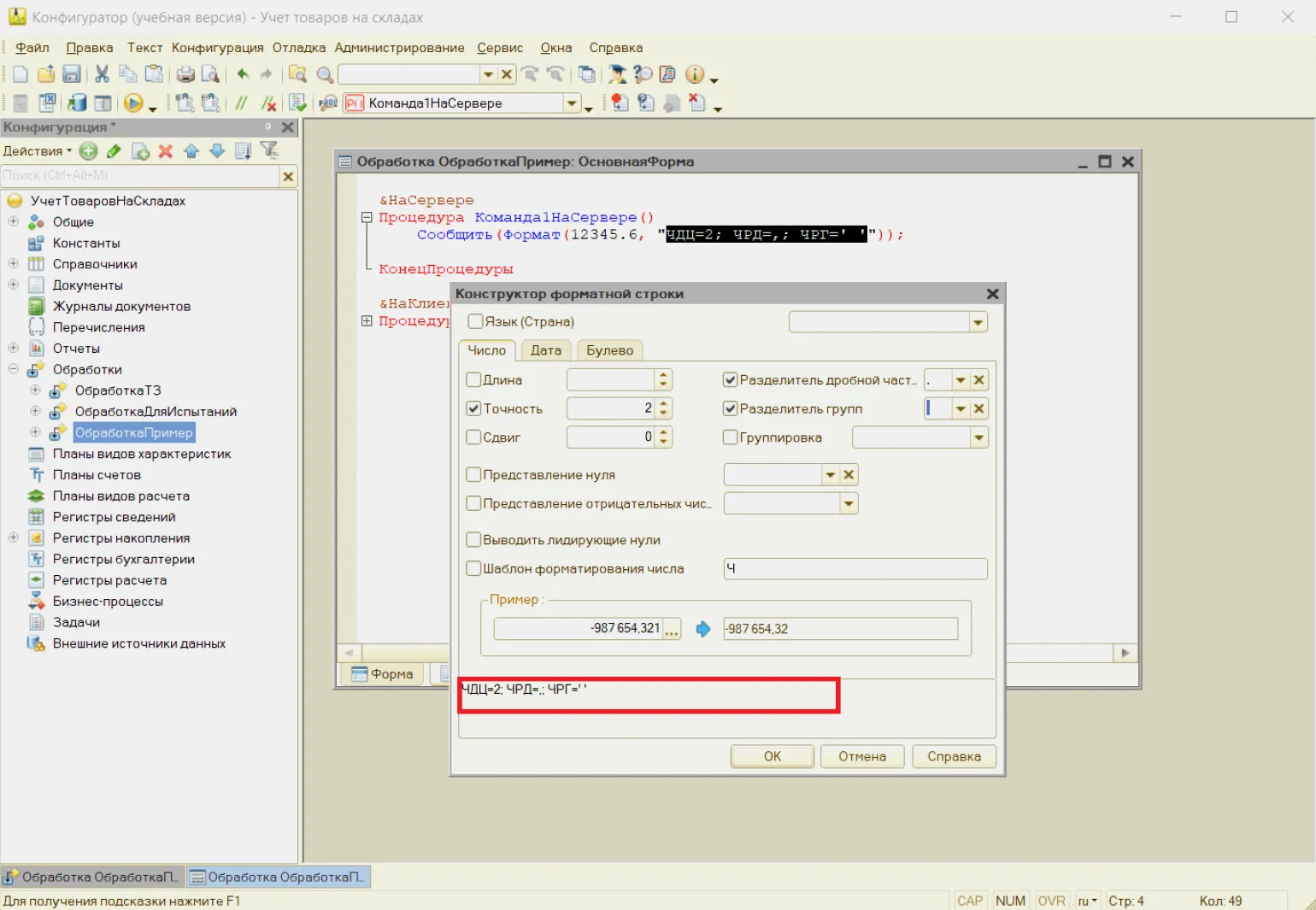
1C has a built-in Format String Designer, which helps simplify the process of developing a template for formatting data. With its help, you can customize the display parameters without having to remember them.
The designer can be launched directly from the code editing interface:
- via the main menu: Text → Command Line Designer;
- To access the context menu, right-click and select "Command Line Designer".
The new window contains three tabs: Number, Date, and Boolean. Each of these tabs is designed for working with a specific data type. The designer displays the available options for each of these types.
The options can be adjusted individually, and we can immediately see the formatting changes at the bottom of the window in the Example area. When we click OK, the code is displayed, which can be edited manually in the editor.
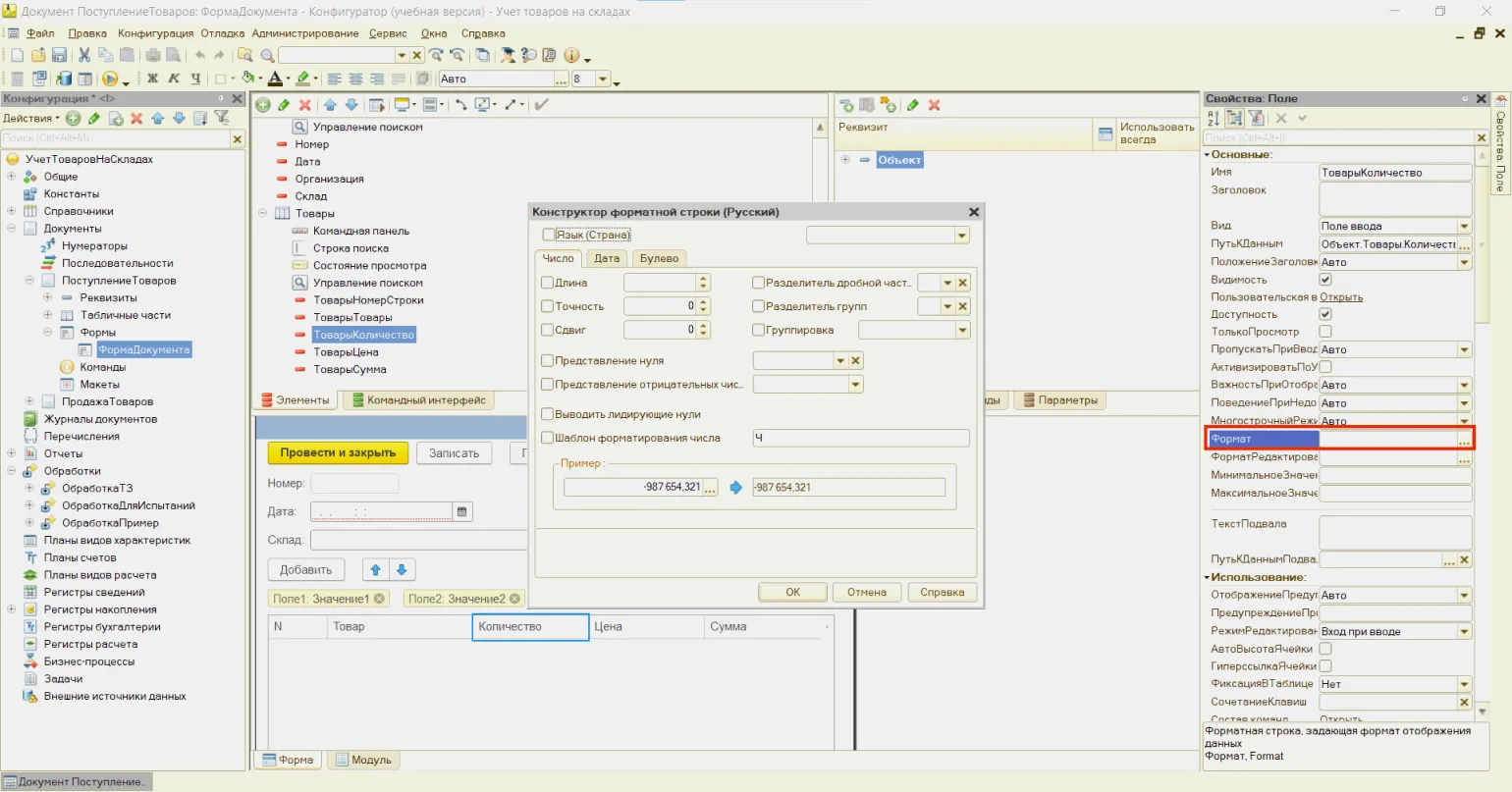
Using the designer, you can interact not only with code but also with input elements on user forms. To do this, select and open a specific form, then select the desired field. In the properties palette, click the button next to the Format field. After that, a familiar window will appear in which you can configure the parameters for different data types.
The format string must match the data type that we pass to the function. For example, a template designed for numbers will not be appropriate when processing dates.
If the format is incorrect, 1C will not be able to process the expression, which will lead to the procedure or function stopping and the display of an error message. Therefore, before starting formatting, it is advisable to ensure that the applied template applies only to a specific value type using the ValueType() function.
For example:
In this case, the formatting will be used exclusively for values of the numeric type. The other options will remain in their original form.
Date and Time Display Standards
Date formatting is widely used in reports and printed forms, as it improves the readability of documents for users. It is important to note that if the date format is not clearly specified, 1C may rely on the regional settings of the operating system. This means that one user might see a date as 03/10/2025, while another might see it as 10/03/2025. To prevent potential misunderstandings, it is recommended to always explicitly specify a date template.
There are two ways to configure the date format: general and localization-specific. Localization involves instructing the system to adapt data to the specifics of a specific region. This allows you to set familiar date, time, number, and month formats for users.
This data display method is available in the Date Format field (DF parameter) in the designer. It defines a specific format in which the date will be presented and is not affected by regional settings, which guarantees its consistency in output.
When specifying the dd.MM.yyyy format, any date will be presented as 11/17/2025, regardless of regional settings.
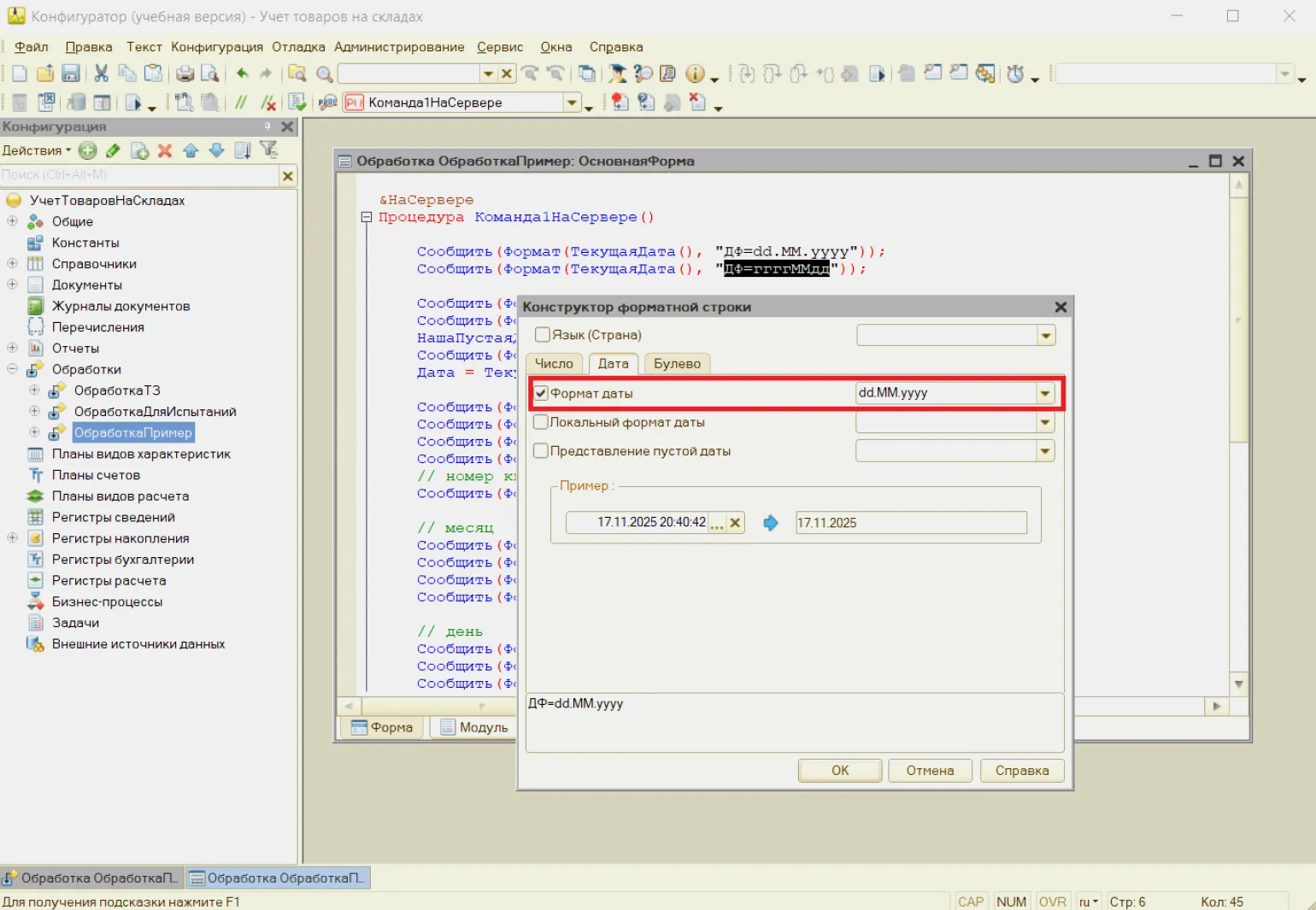
The DF parameter uses certain symbolic notations that inform the system which date elements should be displayed and in what format. Each symbol serves as a formatting instruction. When encountering such a letter, the system replaces it with the corresponding part of the date.
The notations are presented as follows:
- g. — an abbreviation for the year.
- The year in full.
- M is the month designation without a leading zero.
- MM is the month designation, which includes a leading zero.
- The month written in words.
- d is the day of the month without a leading zero.
- dd is the day, formatted with the addition of a leading zero;
- ddd is an abbreviation for the days of the week, such as Monday, Tuesday, Wednesday, and so on.
- The day of the week in full.
- k is the quarter number;
- h is the hour designation, which varies in the range from 0 to 12.
- Ч — hour from 0 to 24;
- м — minute;
- с — second.
The format string may contain Characters separated by specific symbols. Most commonly, spaces, slashes, periods, hyphens, and similar characters are used as such separators.
For example:
The date format used in the system is determined by the DLF parameter. This parameter is based on the regional settings of the infobase, which can be found in Configurator → Administration → Regional Settings of the infobase, as well as the value of the Language (Country) parameter. Thus, the same software object can be displayed differently for users from different countries, which corresponds to their usual date recording formats.
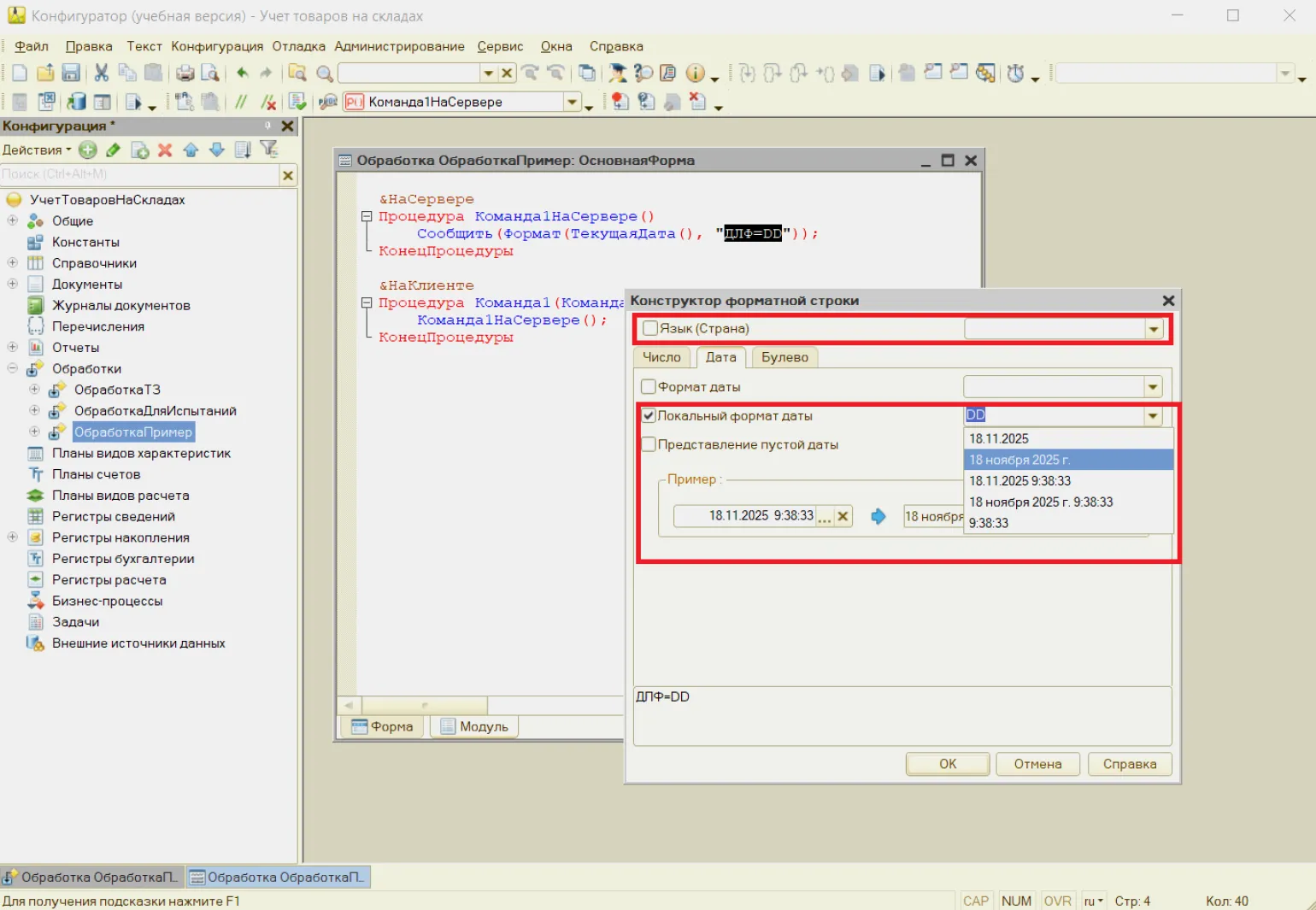
For example.
At the moment, I can't Provide date information with the month in words.
In Greek:
In 1C, there is a special value for an empty date, which indicates that there is no date information. Internally, the system represents this empty date in the format 00010101000000, but in the user interface, it is usually displayed as a blank field.
An empty date can occur in various circumstances. The most common case is when the user does not enter a date in the appropriate field; in this case, the program records this value as blank. A similar situation occurs if the date in the document is optional and the developer does not set any value for it.
There are several ways to represent an empty date in reports using the DP parameter:
Number Formatting
In 1C, there are many ways to represent numbers: they can be displayed with a certain number of decimal places, rounded, spaces can be added to separate thousands, and much more. All these settings are controlled using special format string parameters.
Determines the number of digits that will be displayed in the fractional part. Rounding is performed according to the principle: "1.5 is rounded to 2."
Example:
Specifies the total number of digits that will be displayed in the number, including its fractional part. When setting this parameter, it is also important to specify the number of decimal places.
Example:
It is necessary to determine whether a number should be multiplied or divided by 10, taking into account its power. If the power is positive, division is performed; if negative, multiplication is performed. This parameter can be useful, for example, when creating legends for graphs.
Example:
The number 123456 will be converted to 123,456 thousands, since it is divisible by 1000.
The separator used to separate the whole number from the fractional part is most often represented by a comma or a period.
Example:
The symbol used to separate groups of digits in the whole number is specified here. When specifying a regular space, the 1C system automatically converts it to a non-breaking space, which preserves formatting when wrapping a line.
Example:
Sets the method for displaying a zero value. By default, zero is not displayed.
Example:
When this parameter is present, the number will be padded with zeros on the left to the required length, which can be useful, for example, when displaying a product article. The value is not specified, since the very presence of the parameter activates this mode.
Example:
This parameter determines how negative numbers will be displayed. Possible options:
In the output template, you can specify the position where the number will be located. For this, use the Ч or N characters.
Example:
Representation of logical data
By default, Boolean values in 1C are displayed as True and False. However, in some cases, for example, in reports and user interfaces, it is necessary to change this format to something more understandable for users - for example, to "Yes" and "No". This can be done manually:
Using format strings in different areas
Format strings are used in queries, for example, when it is necessary to pre-format a date or number before displaying them, defining the desired format directly in the code.
The Format() function is widely used, especially when it comes to unloading data into external files such as XML, JSON or CSV, as well as when creating texts for interaction with other systems.
Let's say we are preparing information for an external accounting system that has specific requirements for the data format. For dates, it is necessary to use the yyyyMMdd format, and for monetary amounts, they should be displayed with two decimal places, with a period as a separator. In this case, we'll use the Format() function.
Let's make sure everything was done correctly:
Here's the result:
Everything went well. The information is formatted according to the accounting software requirements.
What to remember
Let's take a quick look at the results:
- The Format() function is designed to present data—such as dates, numeric values, text, or Boolean variables—in a user-friendly format. This is especially useful when preparing reports, developing interfaces, and in other similar situations.
- This function has two arguments: the first is Value, which is the data to be converted, and the second is FormatString, which defines the desired appearance of this data. For example, using this function, you can round numbers to a certain number of decimal places or format a date according to established requirements.
- To avoid having to remember all the possible parameters for different data types, we recommend using the Format String Constructor. This tool allows you to manually customize the display of numbers, text, dates, and Boolean values, while immediately displaying the final result.
- If your system contains different data types, such as numeric values and dates, we recommend using the TypeValue() function to prevent possible errors. This feature allows you to choose formatting depending on your specific needs.
Learn more exciting information about coding in our Telegram channel. Join us!
Read also:
- Introduction to 1C programs: their purpose, operating mechanisms, and the implementation process
1C programs are powerful tools designed to automate various business processes. They are used in a wide variety of areas, including accounting, trade management, manufacturing, and many other areas. The main goal of these programs is to optimize the work of organizations, increase efficiency, and simplify routine tasks.
The operation of 1C programs is based on the use of a database that allows you to store and process information. Users can enter data, perform calculations, and receive reports in a convenient format. An intuitive interface and flexible settings make these programs accessible even to those without extensive IT knowledge.
Implementing 1C solutions is a complex process that includes several stages. First, it's necessary to analyze business needs and select the appropriate product. Then comes customizing the software to meet the organization's specific requirements. Finally, user training is provided, enabling them to effectively utilize all the software's functionality.
Thus, 1C programs are indispensable assistants for businesses, helping to simplify work and provide a high degree of process control. Their implementation requires a careful approach and meticulous preparation.
- The theory of relativity explains the relationship between gravity and speed, revealing fascinating aspects of the structure of our world. According to this theory, gravity doesn't just attract objects, but also affects spacetime—the four-dimensional continuum in which we exist.
When an object moves at high speed, its time slows down relative to stationary observers, leading to an effect called temporal dilation. This means that the faster an object moves, the slower time passes for it compared to those at rest.
Furthermore, gravity also affects the geometry of spacetime itself. The mass of objects curves this space, creating "pits" that cause what we perceive as gravitational attraction. This effect can be compared to how a heavy ball placed on a rubber surface deforms the surface, causing lighter objects to move toward it.
As for the ripples that spread throughout the universe, this phenomenon is related to gravitational waves. They occur when massive objects, such as black holes or neutron stars, collide or orbit each other. These waves are the result of fluctuations in spacetime and can be detected with high-precision detectors. Thus, the theory of relativity not only explains gravity and velocity but also shows how the dynamics of massive objects can cause fluctuations in spacetime itself.
- A 1C programmer is a specialist who works with the 1C:Enterprise platform, designed to automate business processes. Their responsibilities include developing, configuring, and supporting various software solutions, such as accounting systems, financial management, warehouse management, and other aspects of enterprise operations.
To become a 1C programmer, it is necessary to study the specific programming languages and tools used in this platform. Typically, this includes mastering the 1C:Enterprise language, as well as understanding the basics of programming and databases. Beginning specialists are advised to take courses or trainings that will help them acquire the necessary knowledge and skills. Practice, working on real projects, and interacting with more experienced colleagues also contribute to the development of professionalism in this field.
Specifics of the work of a 1C programmer
We will help you master 1C programming and find your first job in just six months.
Learn more