
Contents:

Learn: The 1C Programmer Profession
Learn More1C programs are an effective tool for solving economic problems. They allow you to quickly and inexpensively calculate payroll and taxes, maintain accounting records, and manage document flow. With these programs, you can control settlements with clients and contractors, as well as generate the necessary reports. Using 1C solutions helps optimize business processes and increase the efficiency of financial management.
1C is not only a set of ready-made programs, but also a powerful development environment. It provides the ability to flexibly customize configurations in accordance with the needs of various enterprises. In this article, we will discuss the key aspects of development in the 1C environment, create the first configuration and write code in the built-in programming language. This will allow you to better understand how to adapt 1C solutions to specific business tasks and optimize the work processes of your company.
- What is 1C and what does it consist of?
- A little about the built-in language
- Creating the first configuration
- Directories
- Documents
- Form designer
- Common modules
- Registers
- Reports
- Conclusion
What is 1C and what does it consist of?
"1C:Enterprise" is a powerful system for automating business processes in organizations of various sizes and fields of activity. It enables effective business process management in both small companies and large holdings. The solution is suitable for wholesale warehouses, online stores, agricultural enterprises, and other industries. Integration with 1C:Enterprise helps optimize operations, increase productivity, and improve financial control.
The system includes two key components: a technological platform and configurations. The technological platform provides a reliable infrastructure for operation, while configurations allow the system to be adapted to the specific needs of users, ensuring flexibility and functionality. The effective interaction of these elements guarantees high performance and stability of the system.
The platform is a comprehensive solution, representing both a development and runtime environment. It includes a proprietary programming language, an integrated development environment (IDE) for programmers, administration tools, and many other components. The platform is developed by 1C, which regularly updates the software, offering new versions with improvements and new features. Currently, the most current version of the platform is 8.3. Configurations are application solutions that cannot function independently and require the platform to operate. They are designed to solve accounting tasks such as bookkeeping, payroll, inventory control, and many others. 1C creates and maintains standard configurations that ensure efficiency and reliability in business process management. Standard solutions from "1C" allow you to automate accounting operations, which significantly simplifies the work of organizations and improves data accuracy.
Here are some examples of popular configurations.
- "1C: Enterprise Accounting" is designed for accounting and tax accounting.
- "1C: Payroll and HR Management" is for calculating payroll and personnel records.
- "1C: Trade Management" is for accounting in warehouses and stores, "1C: Retail" is for the automation of retail outlets.
There are many industry-specific solutions in addition to standard configurations, such as "1C: Catering", "1C: Beauty Salon", "1C: Bread Factory" and others. Most products from "1C" are open source, which allows them to be edited and adapted to specific business needs. This makes it possible to add new functions and modify algorithms, creating solutions that best suit the unique business processes of each company. The use of such adapted configurations contributes to increased efficiency and improved resource management.
1C configurations can be created from scratch or use ready-made solutions, adapting them to specific business tasks. Developing 1C configurations from scratch allows you to take into account all the unique requirements of the company, while customizing existing solutions significantly speeds up the implementation process and saves resources. Both approaches have their advantages and can be selected depending on business needs.
Configurations are nothing more than descriptions of objects and the algorithms for their interaction, and do not themselves contain data. To enable users to work effectively with the system, the platform creates an information base. Based on these descriptions, tables are formed and relationships between them are established, which allows you to organize and structure the information for ease of use.
The information base is a collection of configurations and user data. It functions on a specific platform that can support several information bases, each of which is based on unique configurations. This allows users to adapt the system to their needs and manage data efficiently. 1C is compatible with several database management systems (DBMS), such as Microsoft SQL Server, PostgreSQL, IBM Db2, and Oracle Database. The specific DBMS is selected during installation, and the programmer does not need to consider this aspect when writing code. This allows you to focus on developing functionality, which significantly simplifies the process of creating and supporting applications on the 1C platform.

Reading is an important part of every person's life. It not only develops thinking and broadens horizons, but also helps improve writing and communication skills. Books, articles, and other forms of text content allow you to immerse yourself in new worlds, learn about different cultures, and gain knowledge in a wide range of fields. Regular reading helps maintain mental alertness and improves concentration. Don't miss the opportunity to enrich your inner world and develop yourself through literature.
A database management system (DBMS) is software designed to create, manage, and organize data storage. DBMSs allow users to efficiently process large volumes of information while ensuring access, security, and data integrity. These systems play a key role in modern information technology because they provide a structured approach to storing and retrieving data.
DBMSs are used in a variety of fields, from business and finance to healthcare and education. They optimize processes related to data analysis, automation, and decision support. Using a DBMS, companies can store data on customers, orders, products, and much more, which in turn improves service and business efficiency.
Important DBMS functions include data access management, backup and recovery, and multi-user access support. Choosing the right DBMS depends on the specific needs of the organization, the volume and type of data, as well as security and processing speed requirements.
Therefore, database management systems are an integral part of modern business and can significantly improve information management.
1C solutions have a multi-platform architecture, allowing them to run on various operating systems, including Windows, macOS, and Linux, as well as through a browser. These solutions easily integrate with external databases, web services, and instant messengers, expanding their functionality. Furthermore, developing applications for Android and iOS mobile platforms is becoming accessible, allowing users to effectively work with data on any device.
The 1C system offers a wide range of features, including video calls, built-in chats, and screen sharing. These tools significantly simplify user interaction. Furthermore, 1C provides functionality for creating a multilingual interface, allowing you to effectively deploy your product in international markets. All of these features can be integrated into your applications, making them more convenient and accessible to users.
Developers on the 1C platform can take advantage of a wide range of training materials, including articles, video tutorials, Telegram channels, and ready-made code. The official 1C:ITS resource offers comprehensive materials that will help you gain a deeper understanding of 1C functionality and enhance your professional skills. These resources are essential for effectively learning and applying the capabilities of the 1C system.
1C: What is this programming language?
The 1C programming language is the built-in language of the 1C:Enterprise platform. It is focused on specific subject areas, making it ideal for automating business processes. It can be used to effectively organize accounting and tax accounting, inventory management, as well as develop CRM systems and other solutions for optimizing enterprise operations. Although it is impossible to create websites or games in this language, its capabilities in automating business processes make 1C an indispensable tool for many organizations.
The built-in language provides limited object-oriented programming (OOP) capabilities. It includes a fixed set of classes with predefined properties and methods, such as Directories, Documents, Registers, Reports, and Processing. Although creating new classes is impossible, the available classes are sufficient for effective development.
The 1C programming language is similar in syntax to Pascal and BASIC, and also includes elements of the T-SQL query language. However, it cannot be considered a direct analogue of these languages. In 1C, code can be written in Russian and English, but most programmers prefer Russian. This allows those who have previously worked with the English version to quickly adapt, since using Russian simplifies understanding and makes the development process more convenient.
Russian syntax has become the main standard in the 1C system. All configurations, as well as many additional reports and processing, are developed using this syntax. This allows users to work effectively with the system and create various solutions adapted to specific business processes. Using a unified syntax simplifies the learning process and increases productivity in working with 1C software.
During software development, programmers not only write code but also use visual design, which significantly speeds up the workflow. Using visual editors, developers create new objects, configure their properties, create interfaces, and establish connections with other objects. The 1C platform serves as a scripting language for writing and modifying object methods, as well as handling events. This makes development more efficient and allows for the rapid adaptation of applications to changing requirements.
Creating the First Configuration
Now that we've become familiar with the terminology, it's time to move on to practical steps. To deepen our understanding of the platform's nuances, let's create a simple configuration called "Warehouse Inventory Management." To do this, download the free training distribution from the official 1C website and install it on your computer. Versions are available for Linux, macOS, and Windows, allowing you to choose the most appropriate platform for your work.
Run the installation program. We'll immediately see that it has created two training databases. However, since our goal is to create a configuration from scratch, we need to click the Add button.

In the opened In the window, select the option "Create a new infobase" and click the "Next" button. This step is important for beginning the process of setting up your new database. Please make sure you have entered all the required parameters correctly before continuing.
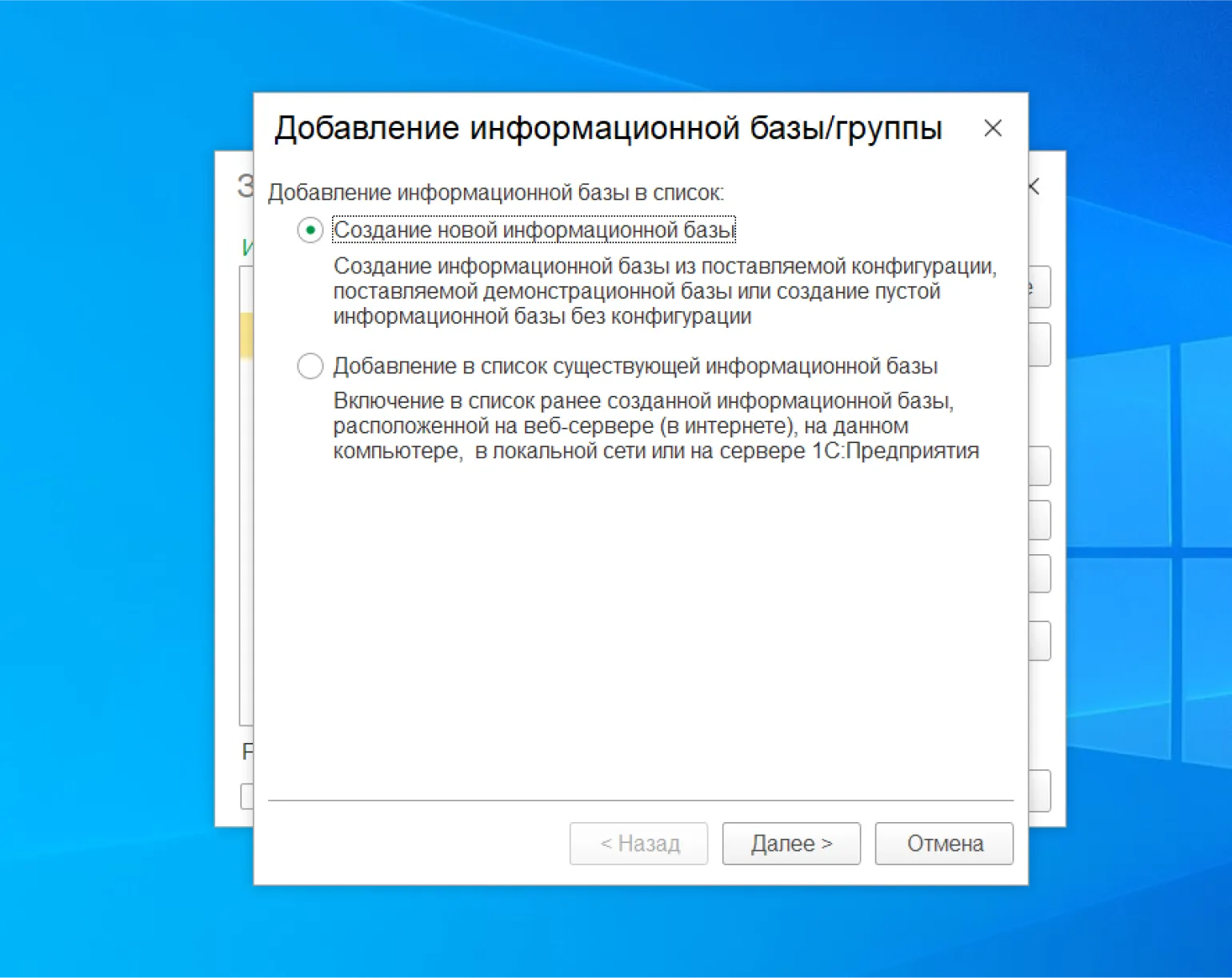
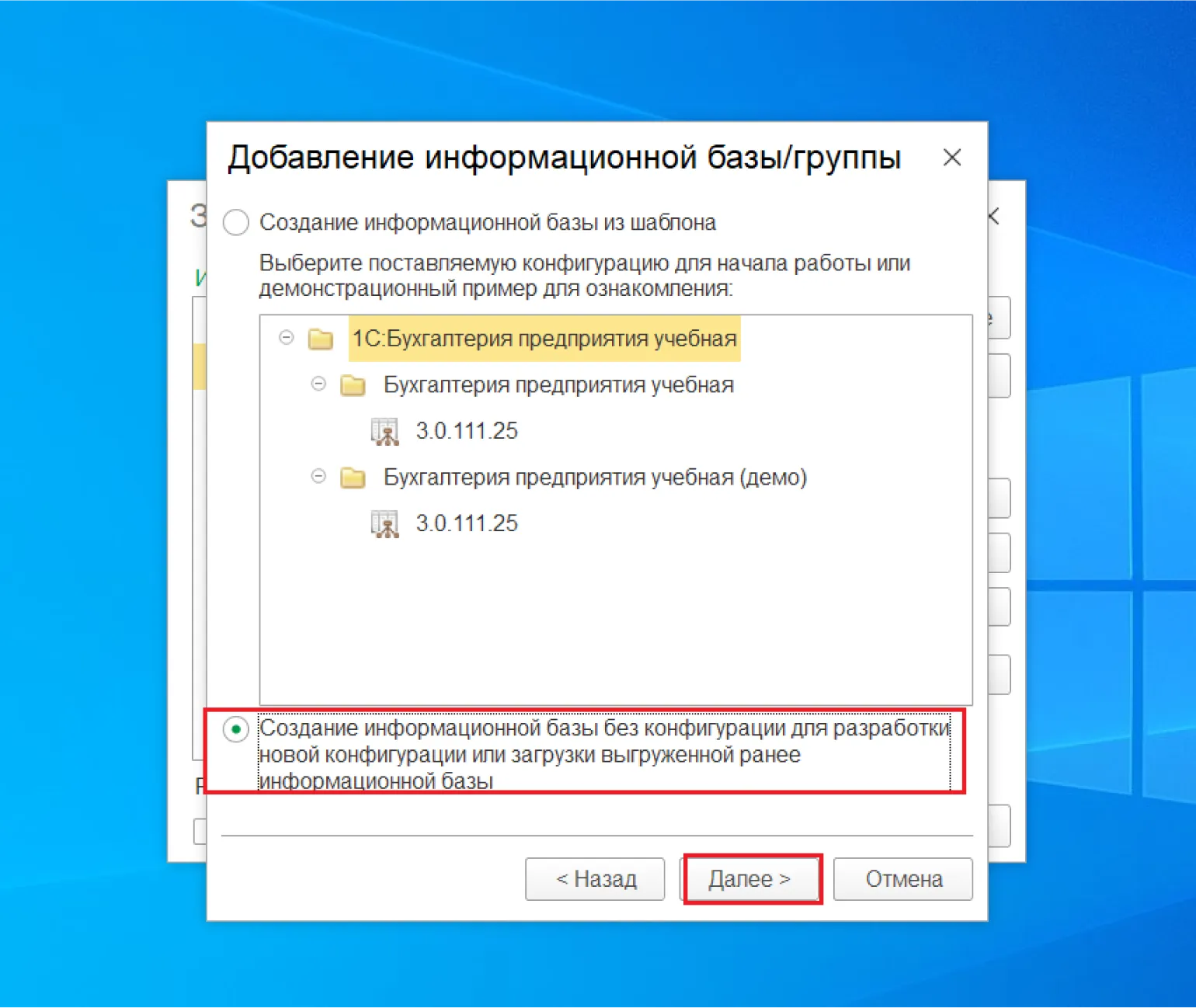
The program allows you to create a database based on the "Enterprise Accounting" template. However, in this case, we select the option “Create an infobase without configuration” and click the “Next” button. This setting allows you to create an empty database, which will provide greater flexibility in further customization and development of specific configurations for accounting.
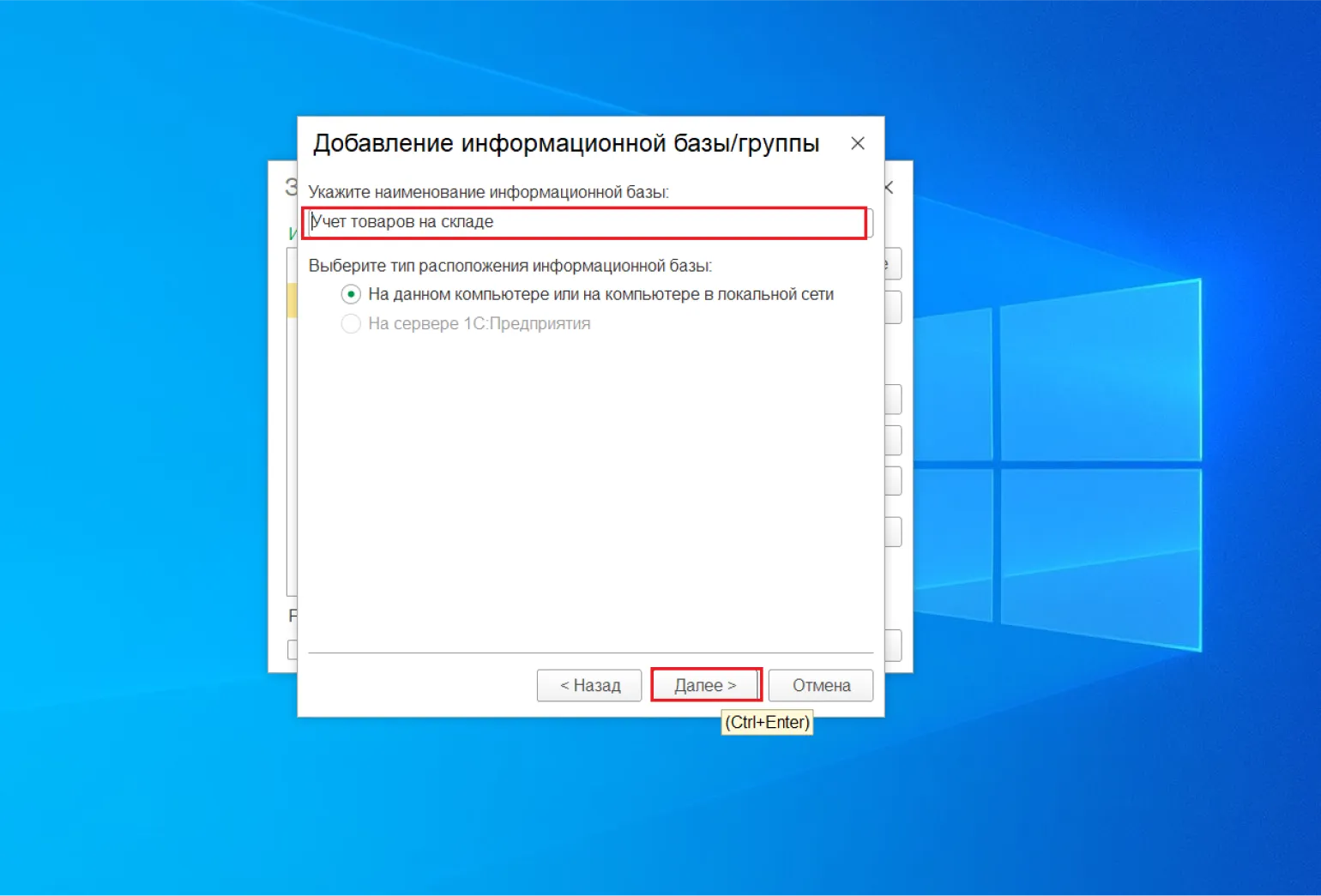
Enter the name of the information base: Accounting products in stock. Click the "Next" button. to continue the setup process.
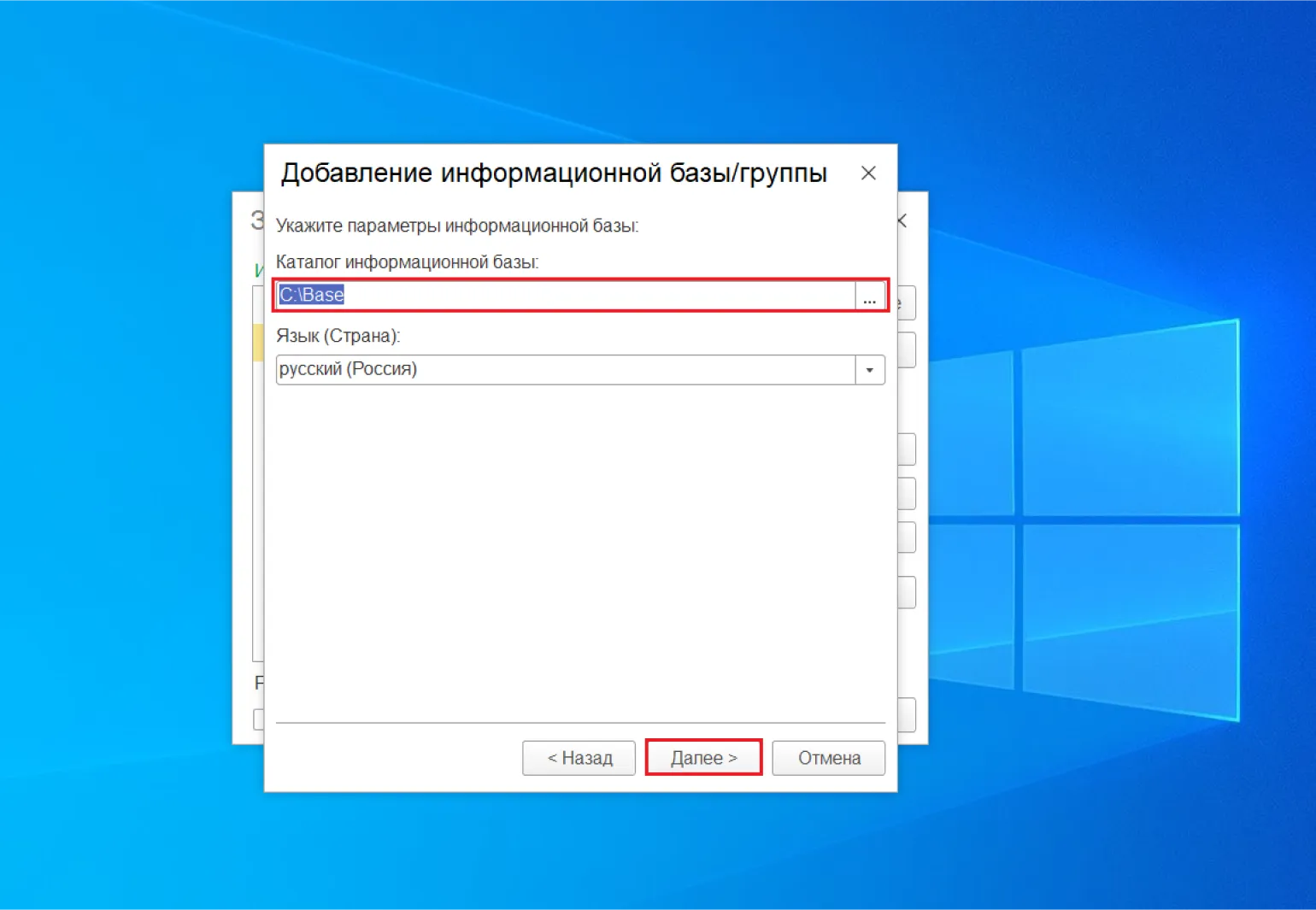
Select a directory to place your information base and click the button «Next».
Leave the default parameters and click the button "Done." This will ensure that your app or device is configured correctly and functions optimally. Make sure all values are set correctly before proceeding.
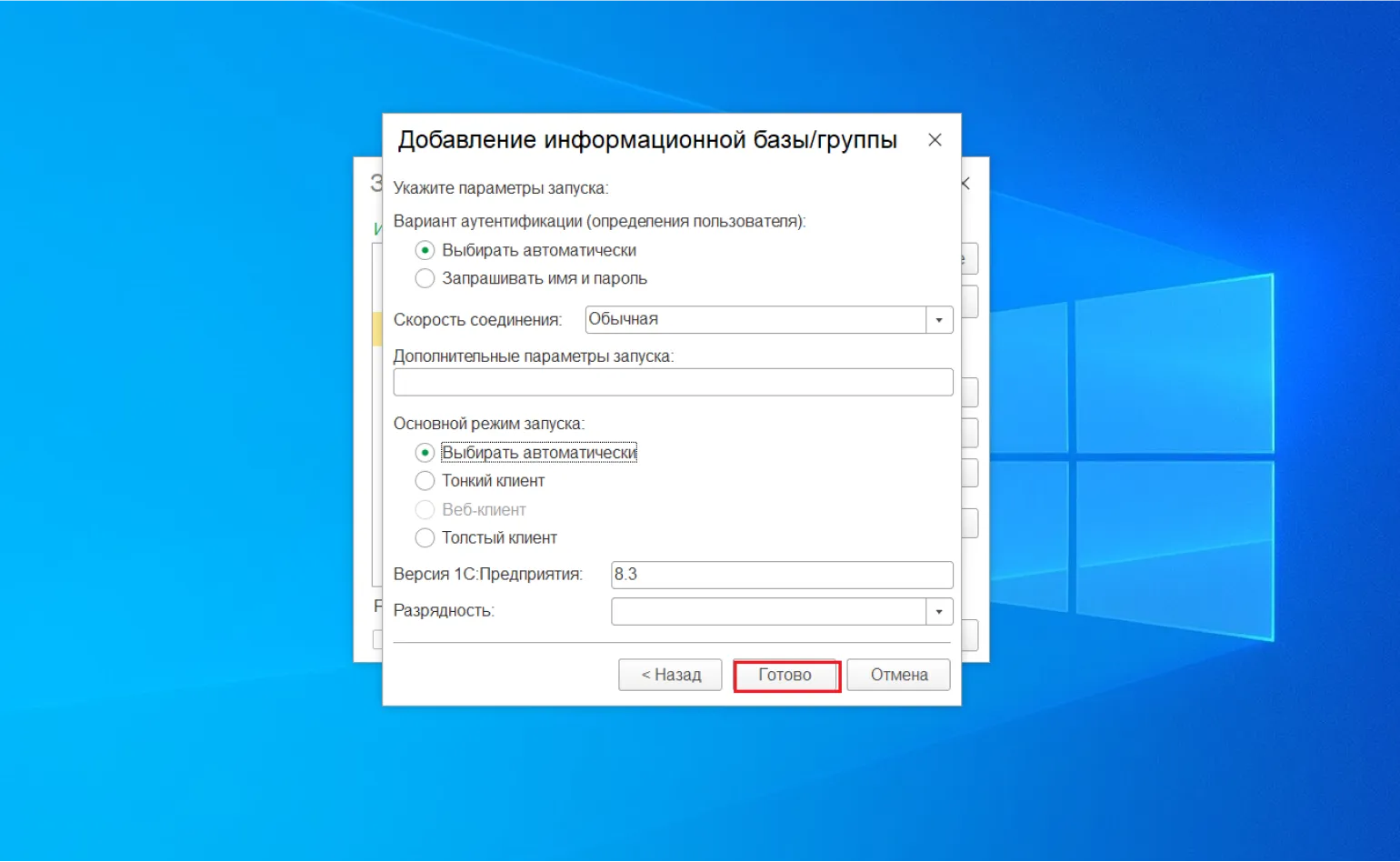
The 1C:Enterprise program launch window is open.
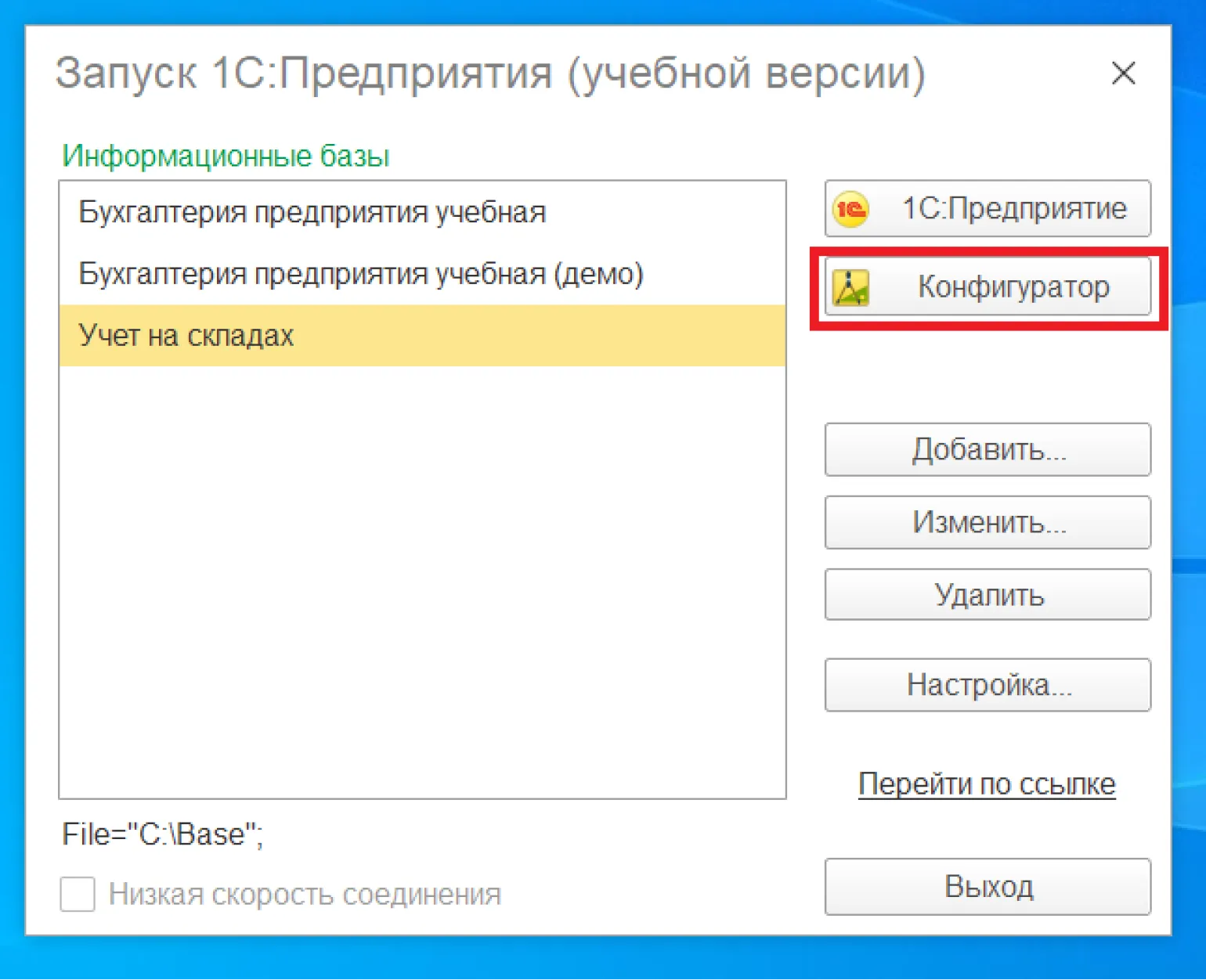
The information base can be activated in two modes. The first mode provides standard access to data, allowing users to perform basic operations with information. Второй режим, в свою очередь, предлагает расширенные возможности, включая более сложные запросы и аналитические функции. Выбор режима запуска зависит от потребностей пользователя и специфики задач, которые необходимо решить. Правильный выбор режима может значительно повысить эффективность работы с информационной базой.
- 1С:Предприятие — пользовательский режим. В нём пользователи работают с данными и формируют отчёты.
- Конфигуратор — режим для разработчика. В нём создаются прикладные решения на встроенном языке и выполняется администрирование информационной базы.
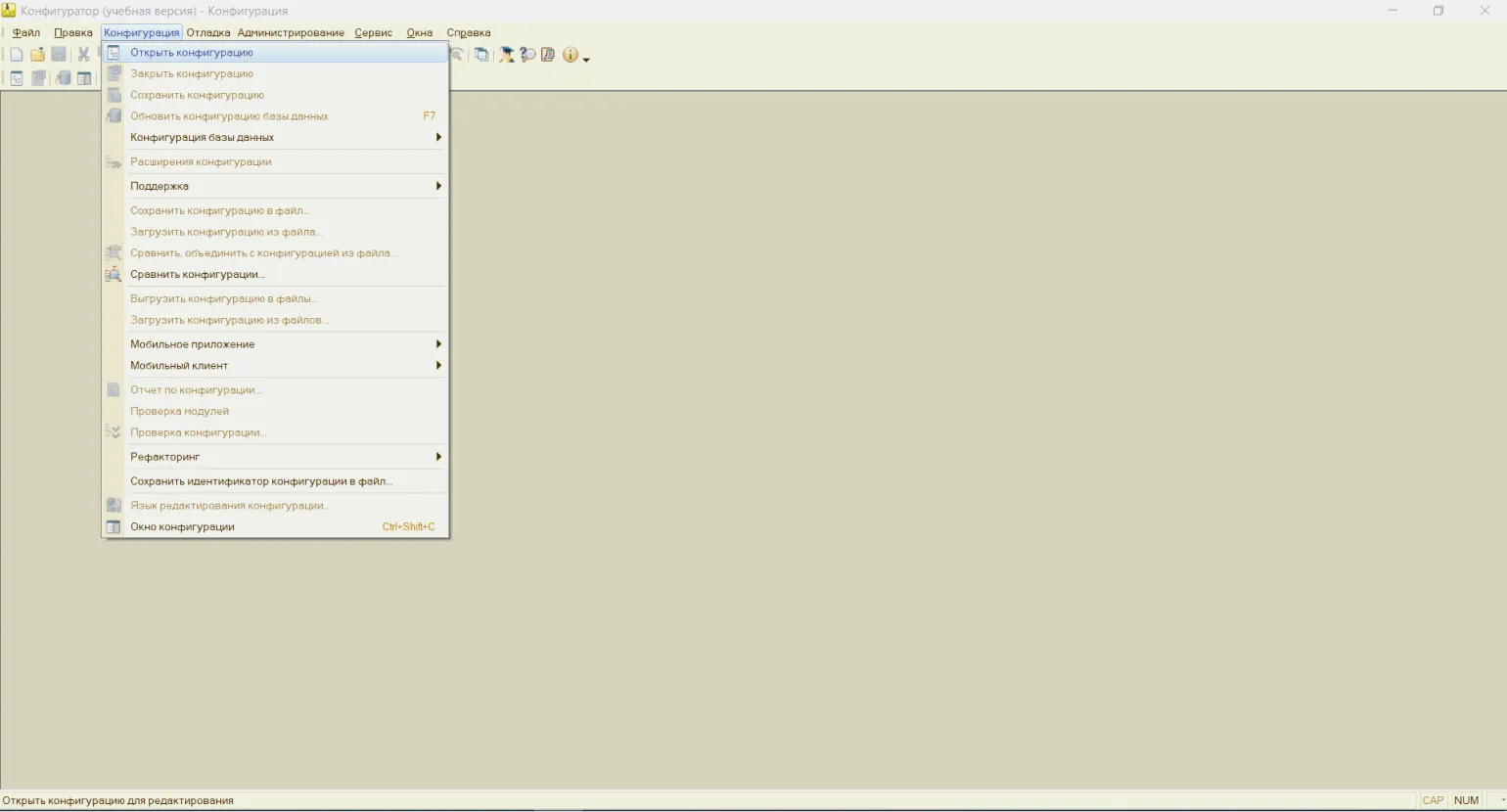
Для того чтобы успешно освоить разработку конфигураций, необходимо запустить базу данных в режиме Конфигуратора. После запуска программы в главном меню следует выбрать пункт Конфигурация и затем открыть конфигурацию. Такой подход позволит вам ознакомиться с инструментами и возможностями для настройки конфигураций в системе.
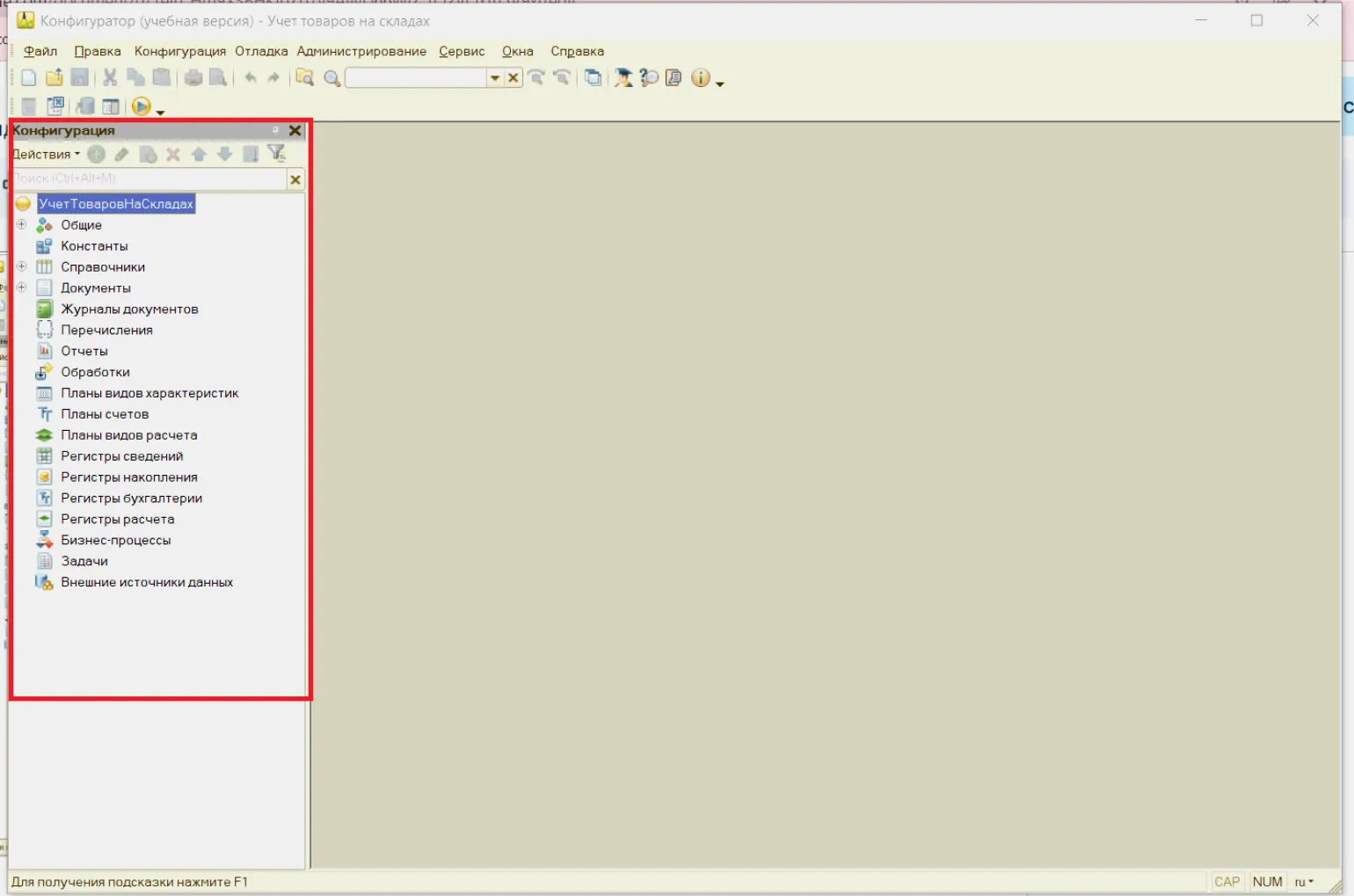
Открывается дерево конфигурации, в котором представлены все классы, используемые для создания объектов, таких как документы, отчеты, справочники и обработки. Это позволяет пользователям эффективно управлять и настраивать необходимые элементы системы.
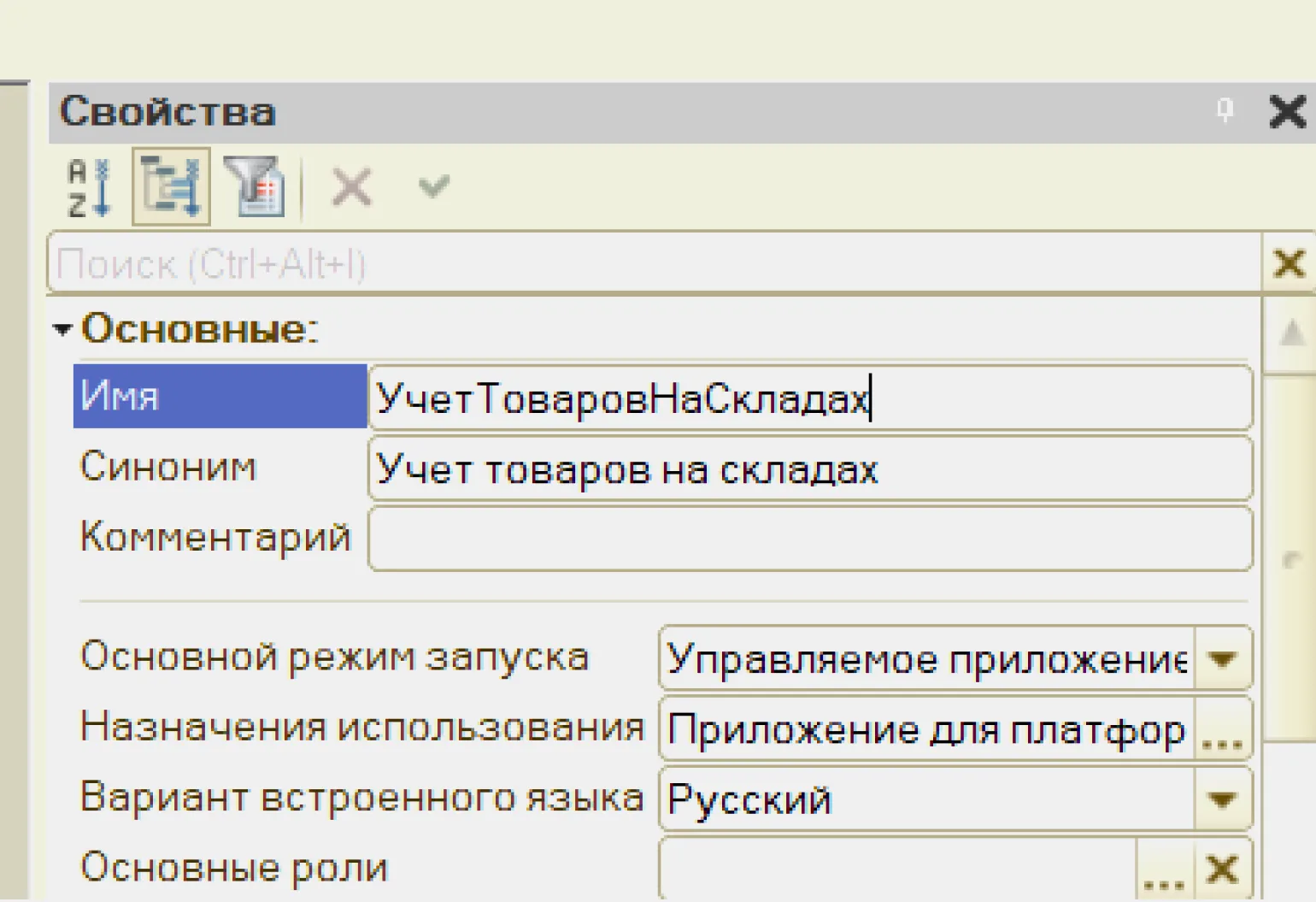
Let's name our configuration. To do this, double-click the root element labeled "Configuration." This will open the properties panel, where you can enter a new name and its synonym. This will allow you to more accurately define and identify your configuration in the system. Synonyms play an important role in forms, reports, and other interface elements, as they must clearly and concisely describe configuration objects. The object name is formed based on the synonym: spaces and invalid characters are removed, and the first letters of words are converted to uppercase. Correct use of synonyms improves the perception of information by users and increases the usability of the interface.
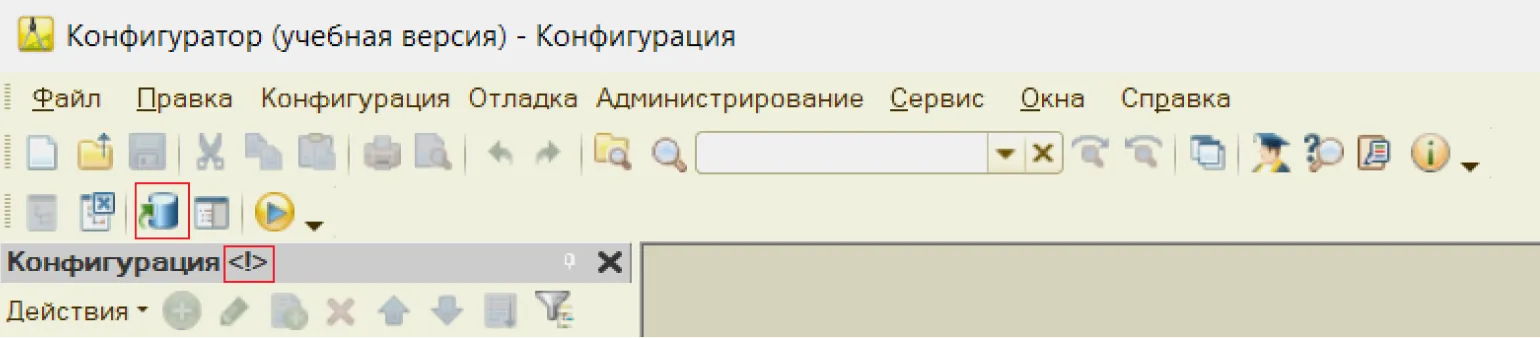
The symbol has appeared in the title of the configuration tree window *, which indicates that changes have been made to the configuration. To save these changes, you need to click on the floppy disk icon.

However, this is not enough to display configuration changes in user mode. It is important to note that the infobase contains at least two configurations: primary and secondary. These configurations play a key role in the system's operation and determine how data will be processed and displayed to users. For changes to be visible, you must ensure that the correct configuration is activated and all necessary updates have been performed.
- Primary - the one the programmer works with. It is not executed in user mode.
- Database configuration. It is intended for users and is executed in 1C:Enterprise mode.
The first version of the text is editable, while the second version is not editable. It can only be updated automatically based on the first version.
A symbol indicating a difference in configurations has appeared in the configuration tree header. This indicates that the database configuration differs from the primary one. To make changes to this configuration, you need to click on the icon with the image of a barrel, as shown in the screenshot.
Directories
Directories are configuration objects designed to store data with a uniform structure and list nature. They are widely used to record information such as lists of employees, products, suppliers, and customers. Directories allow you to effectively organize data and provide convenient access to it, making them an important tool in information management. Proper use of directories helps optimize processes and improve work efficiency.
Creating the first directory in our configuration—Organizations—is an important step for effective accounting. This directory is designed to store the details of organizations for which accounting must be organized. Information about the details will be useful not only for internal management but also for preparing various reports. Properly setting up a directory will help ensure data is up-to-date and simplify the accounting process.
To add a new item to the Directories section, right-click on the appropriate item and select Add. You can also use the Insert key on your keyboard to speed up the process.

Two windows opened: the reference editor and the properties palette. These windows provide the ability to edit properties, events, and methods, which are conveniently grouped into thematic categories. This simplifies the process of working with elements and allows you to quickly find the necessary settings for their optimization.
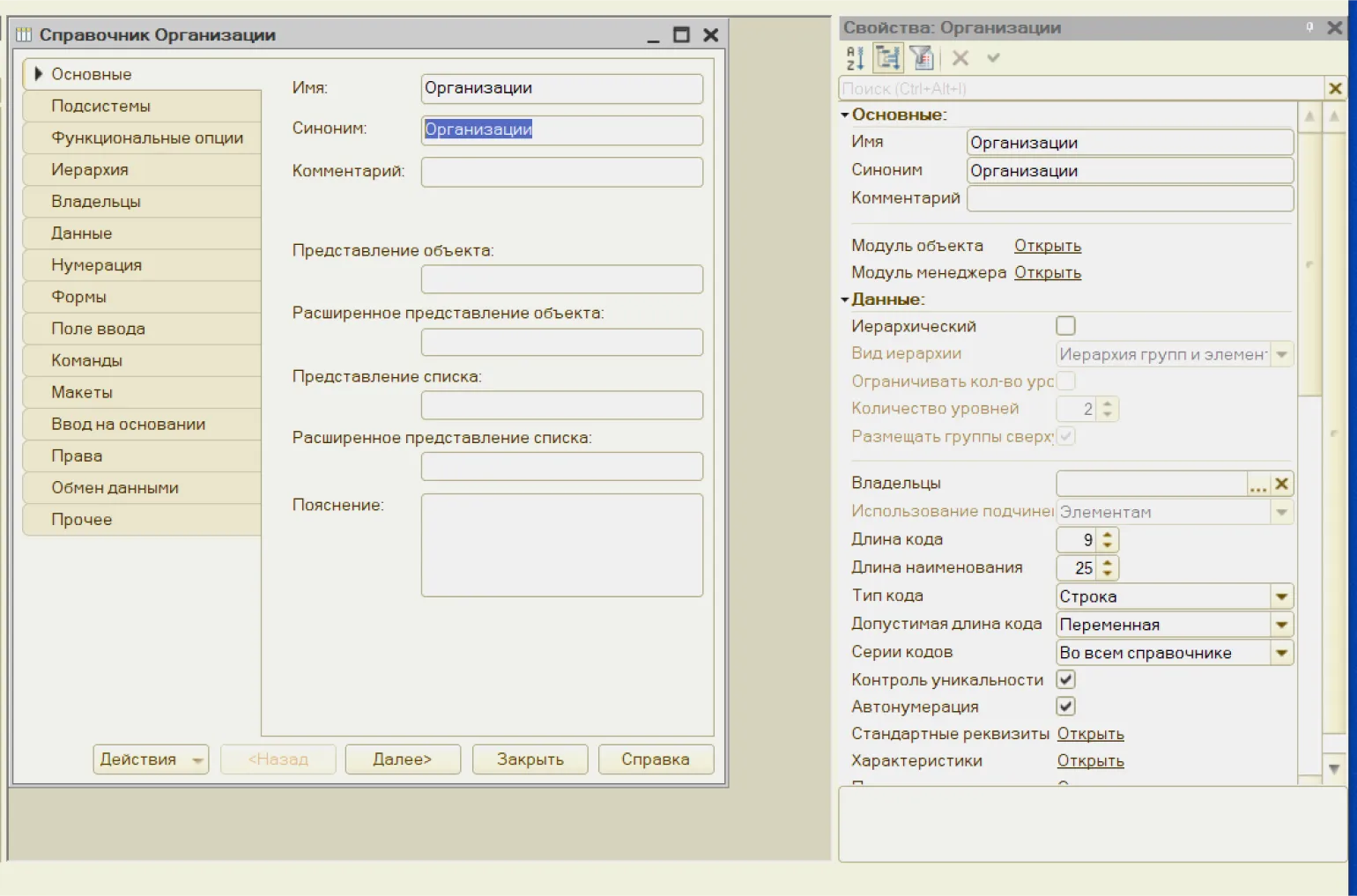
In the next step, we will add the details to our directory. These fields will become available to the user in the interface where they can enter information about organizations. Properly setting up these details will ensure ease and efficiency of data management.
Each directory element contains two required details: a code and a name. The user specifies the name, while the code is generated automatically by the system. The program monitors the uniqueness of codes, preventing their duplication within a single directory. This ensures the integrity and structure of the data, which is critical for effective information management.
The "Address" detail will be added to the directory, which is intended to store the organization's address. This detail will be of the "String" type. Properly specifying the organization's address is important to ensure the accuracy of contact information and improve customer communication.
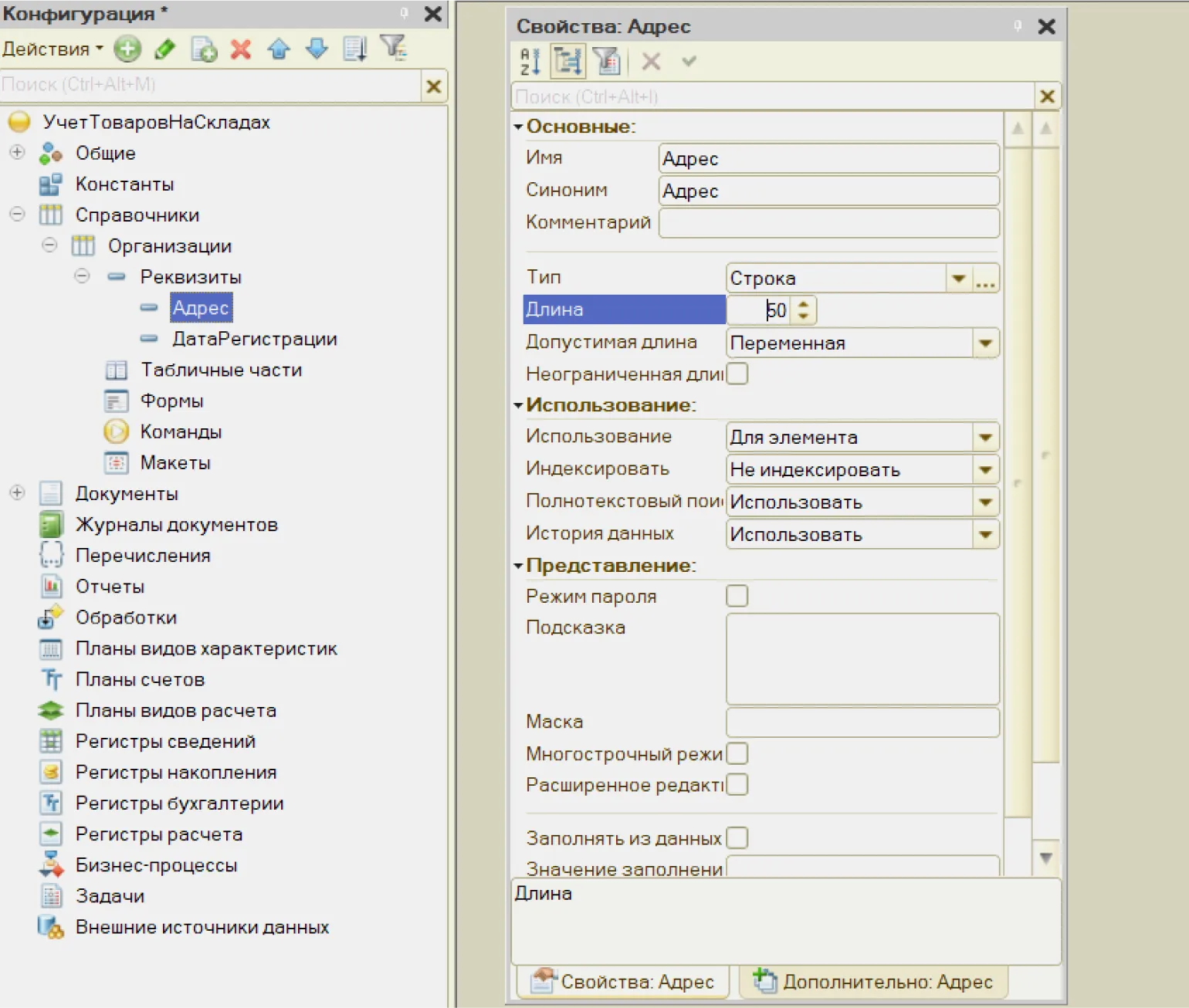
The registration date is an important detail and represents a data type Date. This field will store information about the date the organization was registered. Correct indication of the registration date is necessary for legal identification and accounting.
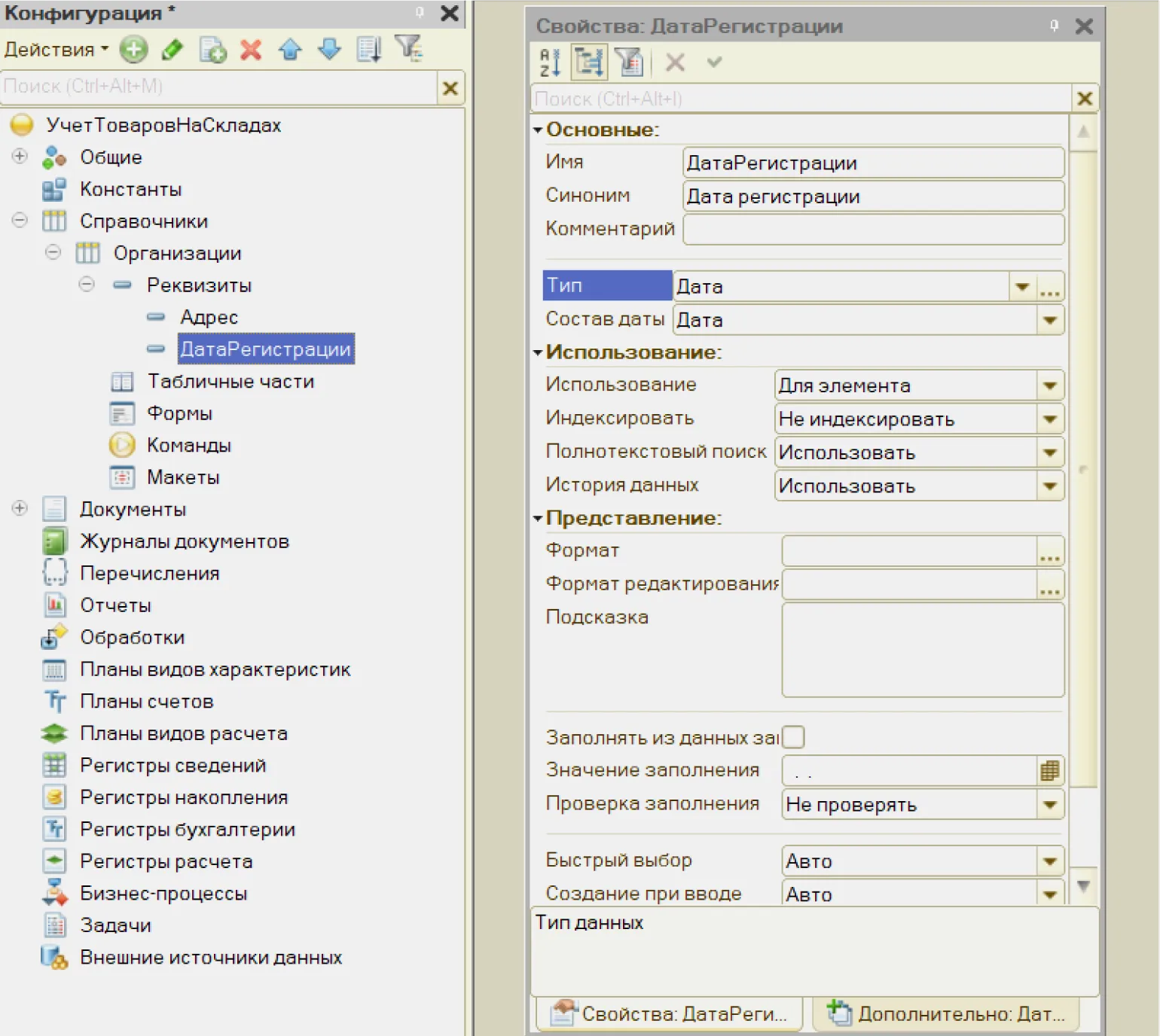
The 1C system provides basic data types, such as String, Number, Date and Boolean, which are the basis for working with information. These data types are defined at the platform level and ensure efficient data management in various applications. Using these primitive types allows developers to create more complex structures and algorithms, which significantly simplifies the process of developing and processing information in the system.
Let's create a new directory called "Warehouses", which will be linked to the "Organizations" directory. Each element of the "Warehouse" directory will have an owner corresponding to an element of the "Organizations" directory. This will allow you to effectively manage warehouse data and link it to specific organizations.
Customization in the editor is an important stage of working with content. Proper formatting and parameter settings can improve the visibility and readability of the text. During the configuration process, you should pay attention to aspects such as the use of headings, highlighting keywords, and optimizing images. This will not only improve the user experience but also improve your page's search engine rankings. Every element of the editor should be configured with SEO goals in mind to ensure maximum impact on your audience. Use analysis and monitoring tools to continuously improve your settings and adapt to changes in search engine algorithms.

Saving changes to the main configuration and in the database configuration. Now let's switch to the infobase in user mode. To do this, press F5 and start the debugging process. This will allow us to test the changes we've made and ensure they work correctly.

The user interface allows you to customize the program's appearance to suit your individual preferences. Users can change the arrangement of panels and sections, as well as use bookmarks for ease of use. To start setting up, go to the main menu and select the item «Settings».

Now let's move on to directory "Organizations". Let's create and save a new element - OOO Dom Tekhniki.

The program automatically generated all the necessary elements for working with the directory. She created forms for entering and displaying data, added input fields based on the details, and automatically filled in the code field. This significantly simplifies the process of working with this tool, allowing users to quickly and effectively interact with information.
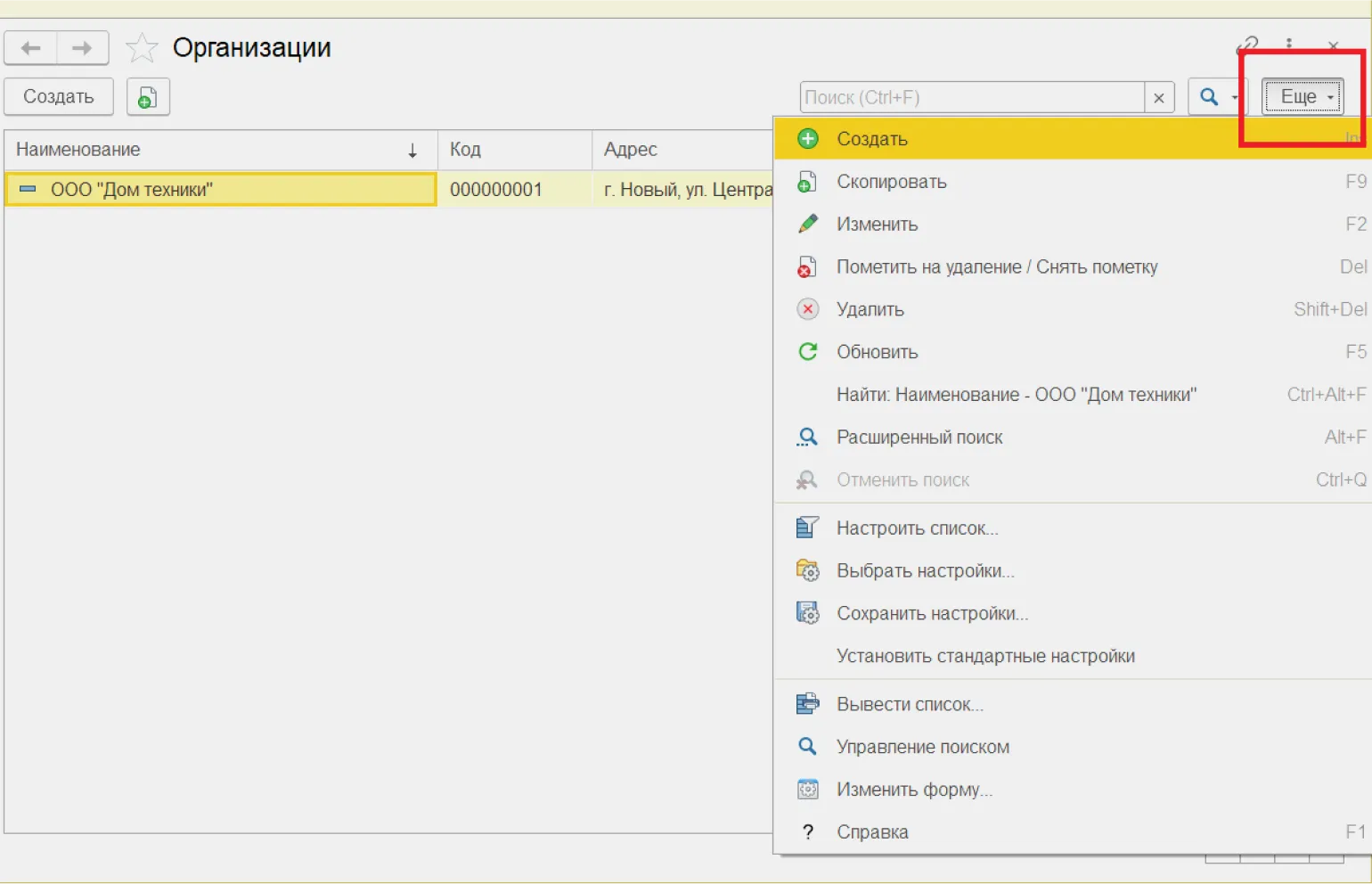
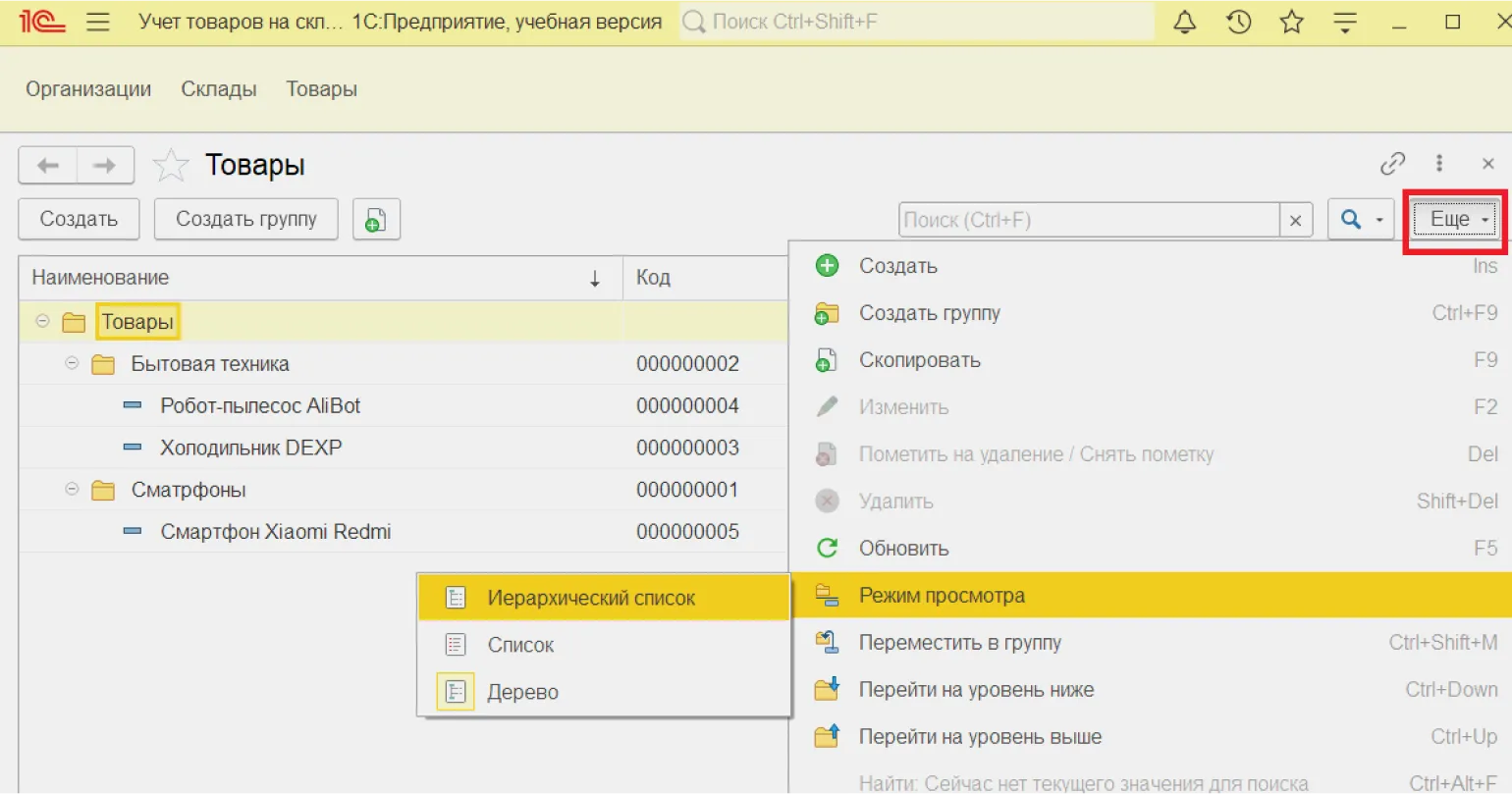
By clicking the "More" button A menu with available actions for working with elements will open.
We offer a wide range of services to help you achieve your goals. Our team is highly professional and has many years of experience in their field. We are ready to offer individual solutions adapted to your needs. Our main goal is to ensure high-quality completion of all projects and the satisfaction of our clients. With us, you will find a reliable partner who will help you implement your ideas and achieve success.
- Search, add, edit, copy and delete directory elements.
- Configure filters, groupings, sorting.
- Change the appearance of the form.
- Output the list to a spreadsheet.
- Select and save form settings.
- Add to favorites.
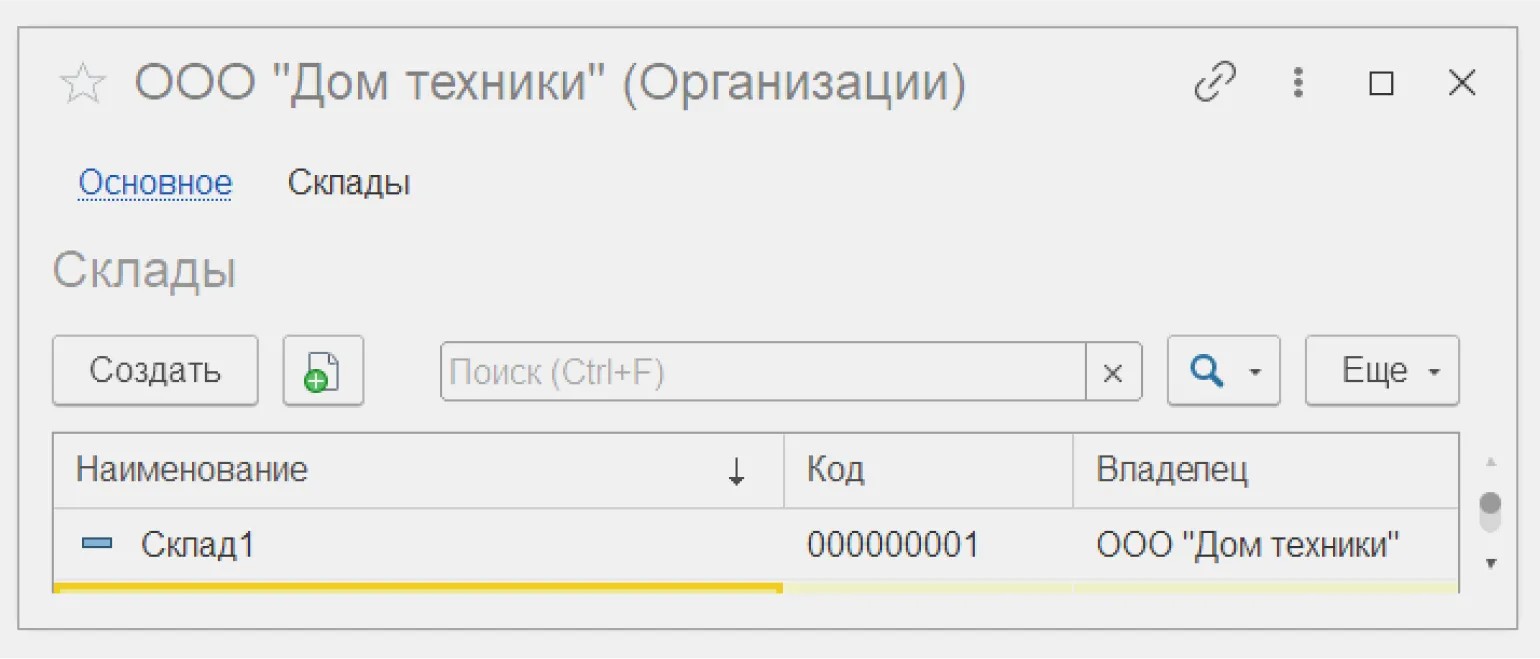
On the "Warehouses" tab in the "Organizations" directory element form, you can manage the elements of a subordinate directory. This feature allows you to work effectively with warehouses, providing convenient access to the necessary information and tools to optimize accounting and inventory management processes.
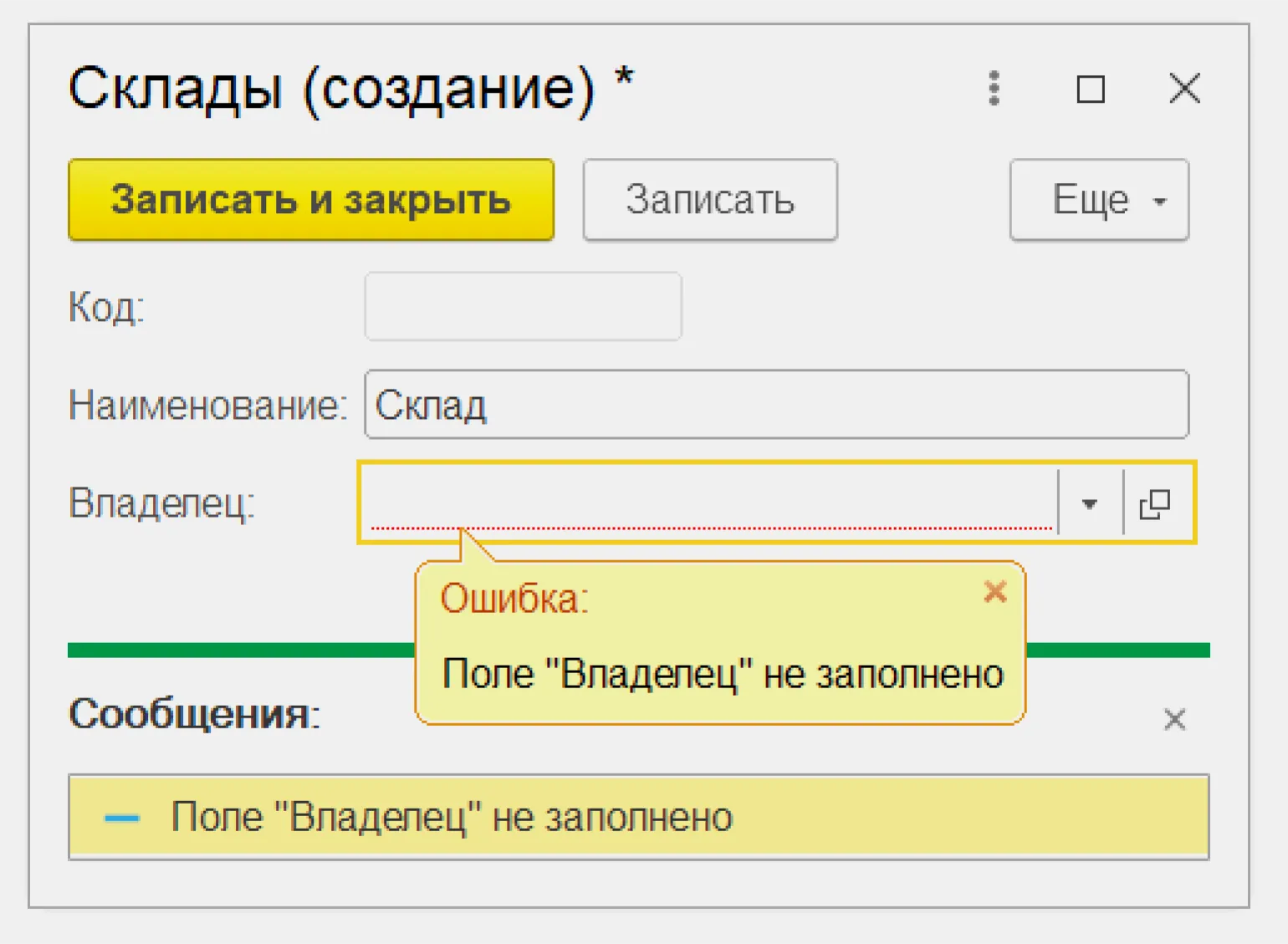
Element A subordinate directory entry cannot be saved without specifying an owner. In this case, the program will display an error message. Make sure you set the appropriate owner before adding the entry. This will help to avoid system failures and ensure the correct functioning of the directory.
For effective warehouse accounting, it is necessary to create an additional directory - Goods. It's recommended to make it hierarchical, which will allow you to group products by category. To do this, enable the corresponding checkbox on the Hierarchy tab in the catalog editor. This approach will simplify inventory management and make it easier to find the items you need.
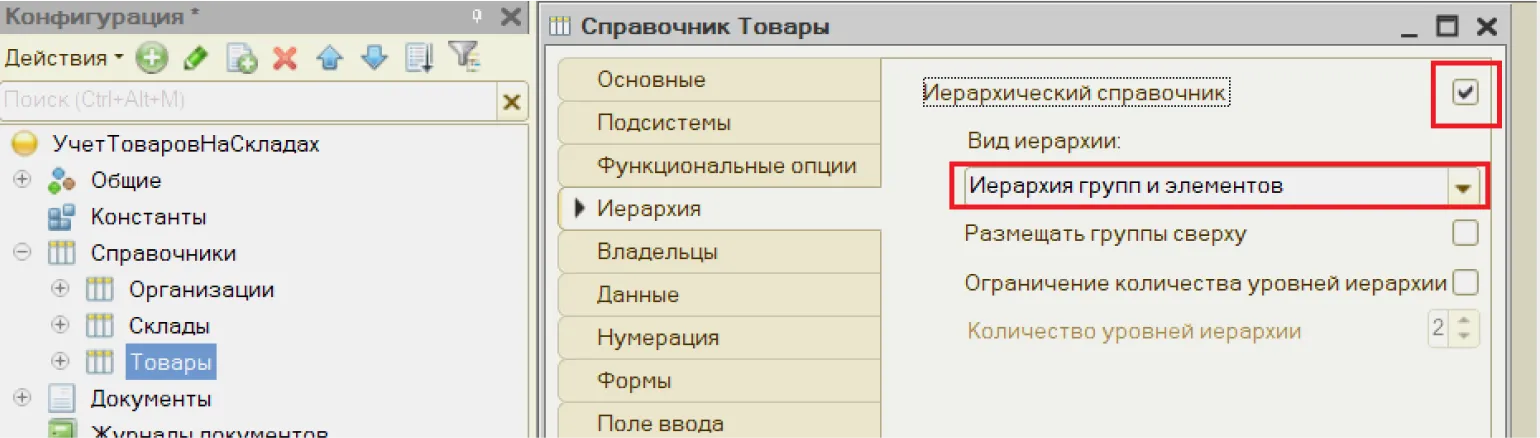
To save the changes, launch 1C:Enterprise. Next, go to the Products directory and create groups, such as "Household Appliances" and "Smartphones." Within these groups, you can add any items you choose. To facilitate navigation and avoid confusion, we recommend using the hierarchical view of the directory. This will allow you to more conveniently manage product groups and items, ensuring effective record-keeping.
Documents
For In addition to reference books, effective warehouse accounting requires documents. These documents record information about business transactions and other events within the enterprise, linking it to time. Maintaining such records ensures transparency and control over the movement of goods and simplifies the analysis and planning process. Proper document preparation and storage is a key element in organizing warehouse accounting.
The standard configuration of "1C: Trade Management" provides a variety of documents for inventory accounting, including invoices and disbursements, transfer and write-off certificates, and other product transactions. In this configuration, we will focus on the use of two main documents: "Goods Receipt" and "Goods Sale." These documents are key to effective inventory accounting, ensuring accuracy and transparency in inventory and sales management.
Each document contains mandatory details such as number, date, and time. The "1C" system offers an automatic numbering mode, which generates unique numbers for new documents and prevents their duplication. Using automatic numbering in 1C significantly simplifies the document flow process and helps avoid errors associated with manual data entry. This is especially important for organizations seeking to improve the efficiency and accuracy of document management.
Let's create a document "Goods Receipt", which records the receipt of goods at the warehouse. This document plays a key role in inventory accounting and ensures the accuracy of product availability data. It contains information on the quantity, name, cost, and supplier of goods, which allows for effective inventory management and control of accounting processes. Correct execution of the "Goods Receipt" document helps minimize errors and simplifies the analysis of goods movement in the warehouse.
The "Warehouse" attribute with the "DirectoryLink.Warehouses" type must be added to the document. This will allow for effective inventory management and tracking of goods movement in the warehouse. Correct use of the "Warehouse" prop will improve accounting processes and increase inventory accuracy.
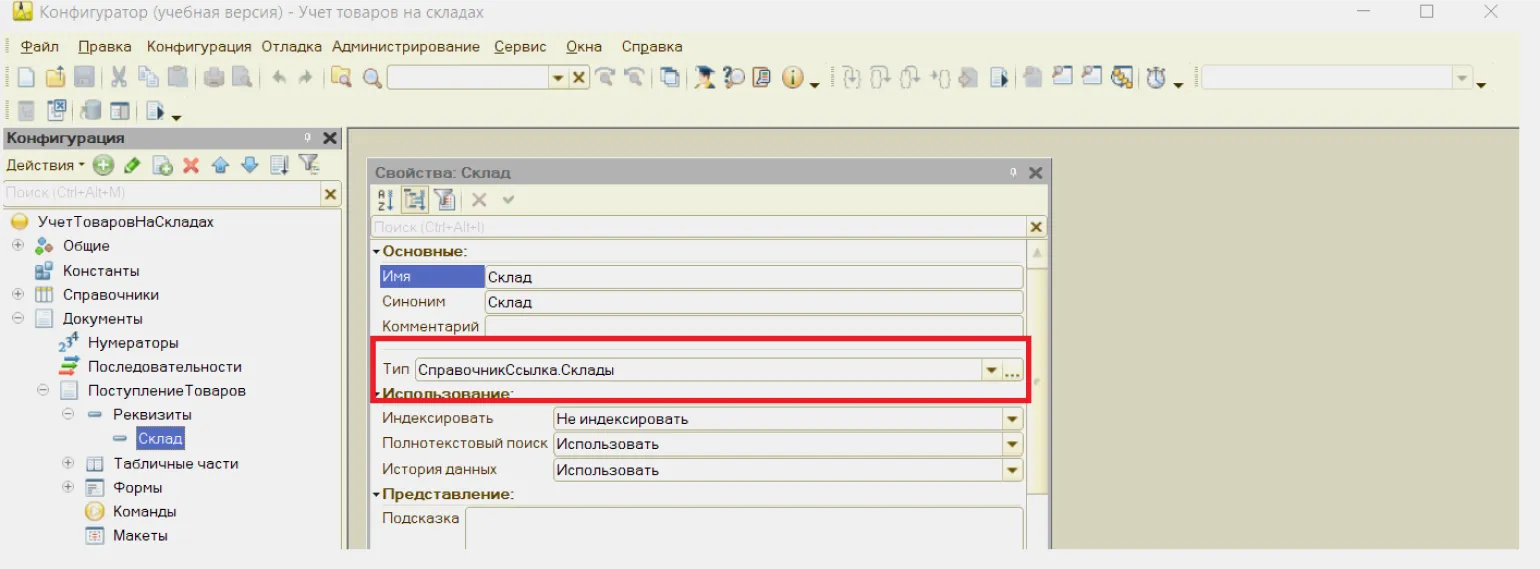
DirectoryLink.Warehouses is an applied data type that does not задается на платформе, а формируется в рамках конкретного прикладного решения. Этот тип данных используется для управления информацией о складах, что позволяет эффективно организовывать учет и обработку товаров. Благодаря прикладным решениям, такие типы данных адаптируются под специфические нужды бизнеса, обеспечивая гибкость и функциональность в управлении складскими процессами.
The expression DirectoryLink.Warehouses indicates that in the GoodsReceipt document database, the Warehouse field does not contain full warehouse information, but only a link to the corresponding record in the Warehouses directory. This optimizes data storage and simplifies warehouse information management in the system. The link structure ensures data integrity and simplifies updating, since changes in the Warehouses directory are automatically reflected in all related documents.
The image shows.

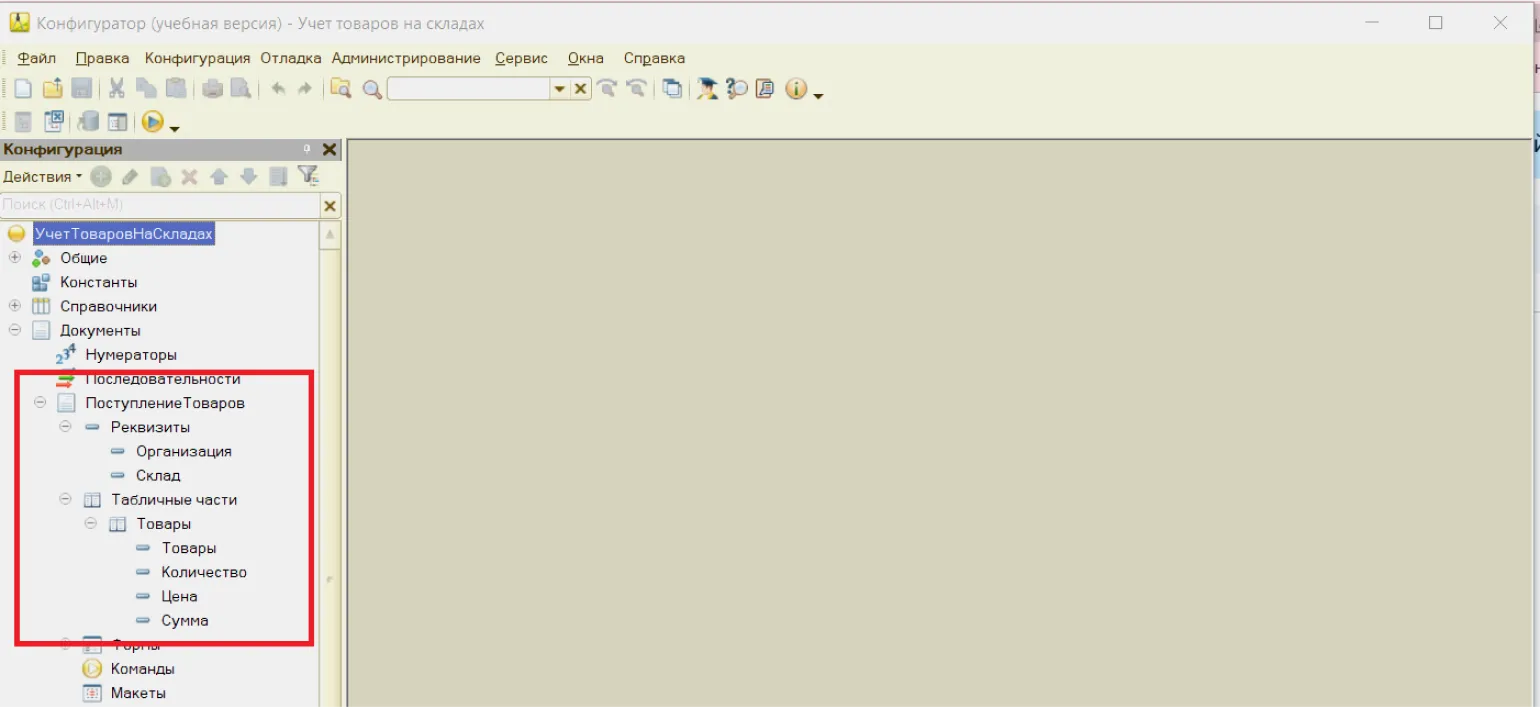
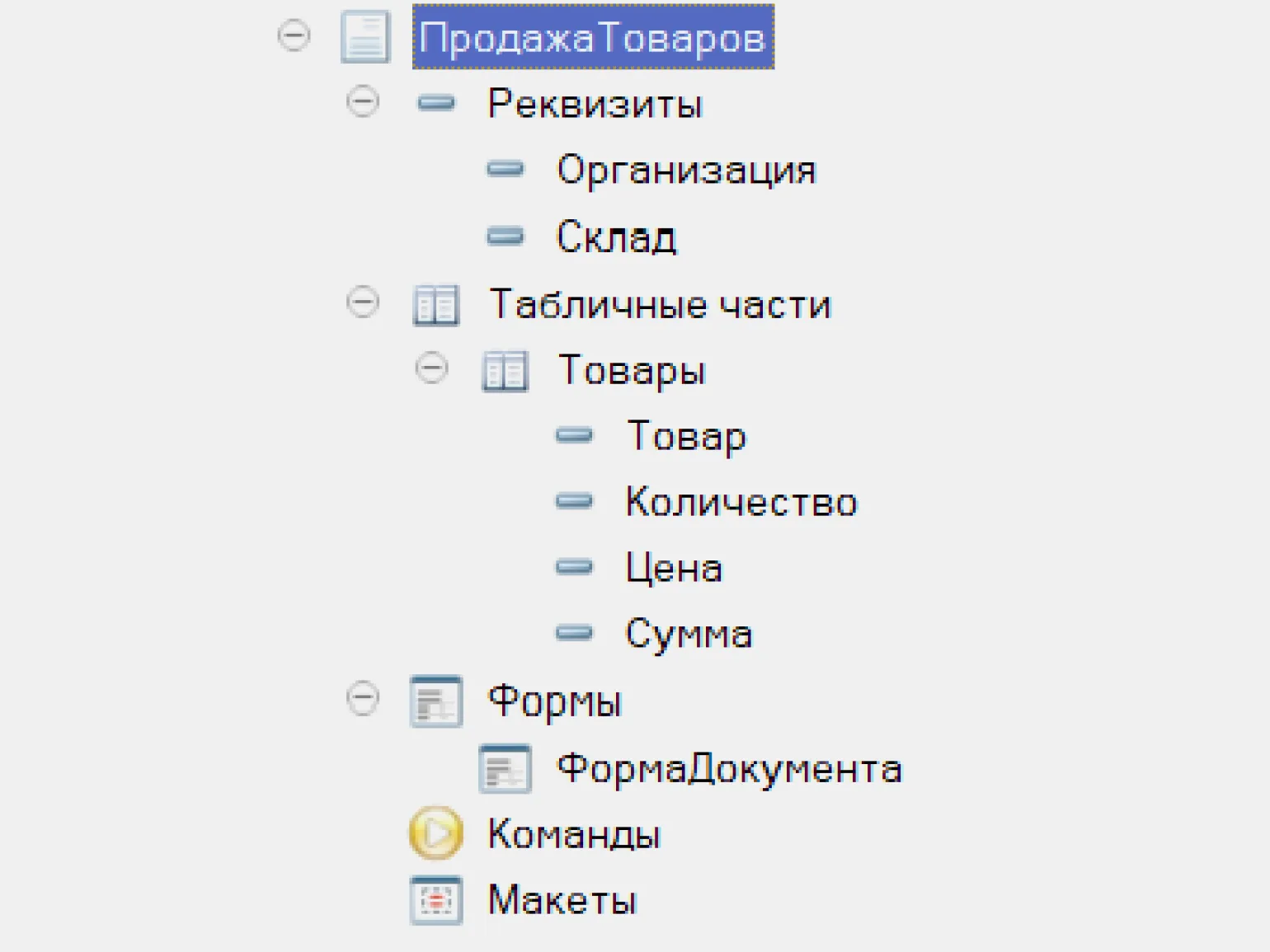
Let's add the "Products" table section. To do this, open the document hierarchy, right-click on "Table Sections" and select "Add". Then, set the table's attributes: "Quantity", "Price", and "Amount". Set the type for all attributes to a non-negative number, a length of 10, and a precision of 2. This will allow us to effectively manage product data and ensure the correct calculation of totals.
Now we have a table displaying all incoming and outgoing products in the warehouse. In the configurator, the document will be presented in the following format:
Now let's launch the user mode of "1C:Enterprise" by pressing F5. Next, we will create a new document "Receipt of Goods" and fill in the necessary details for the correct accounting of receipts.
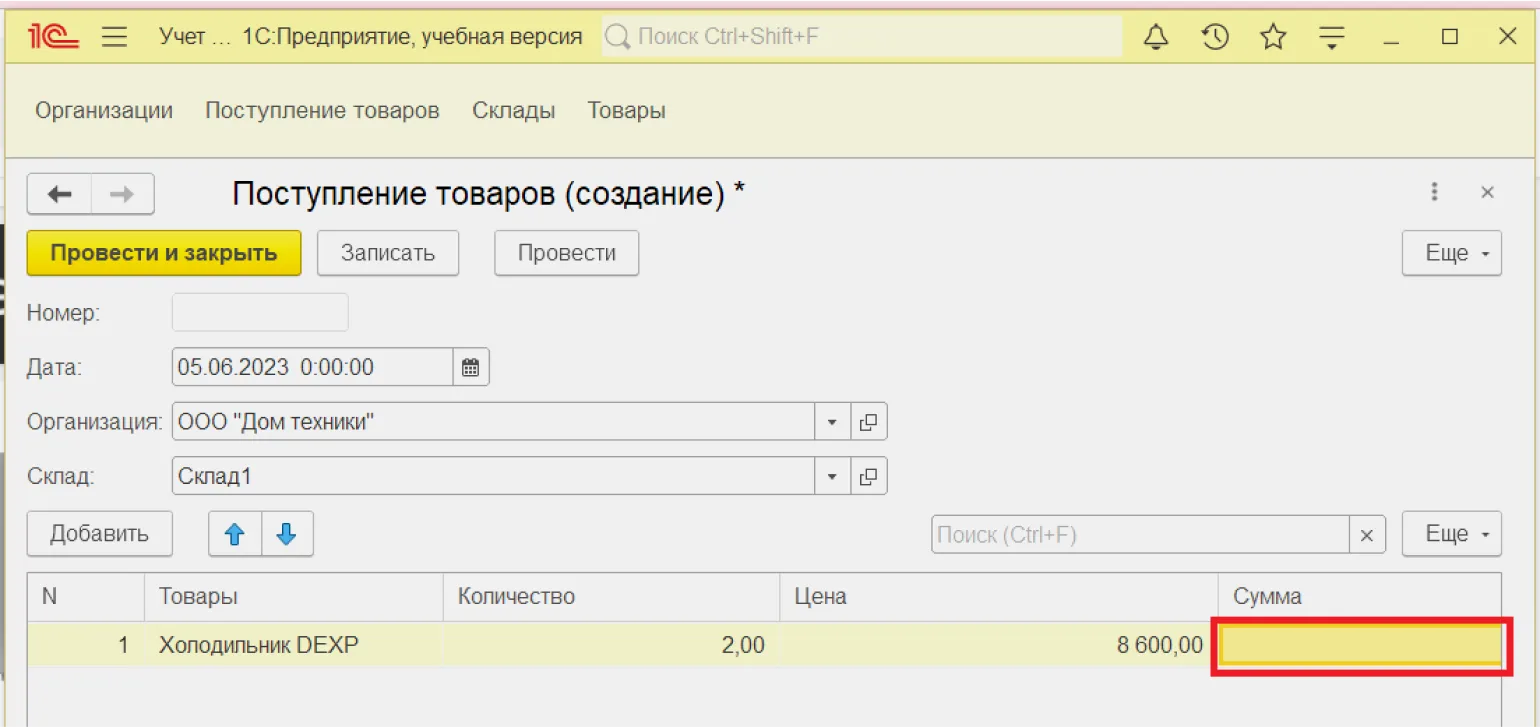
The first record has appeared in our table. However, there is one issue: when entering the quantity and price, the amount is not calculated automatically, which causes inconvenience. To solve this problem, you need to launch the document form designer and write the appropriate code. We will explain how to do this in detail in the next section.
Form Designer
The form designer for an object, for example, a document, allows you to create custom forms for displaying this object. It is automatically activated when you create a new form, which simplifies the process of developing and customizing the interface. Using the form designer promotes more effective user interaction with the system, providing an intuitive and functional interface.
Let's configure the Goods Receipt document form in the configurator. To do this, select the «Form» element in the document menu and click the «Add» button. The form designer window will open, where you can make the necessary changes.
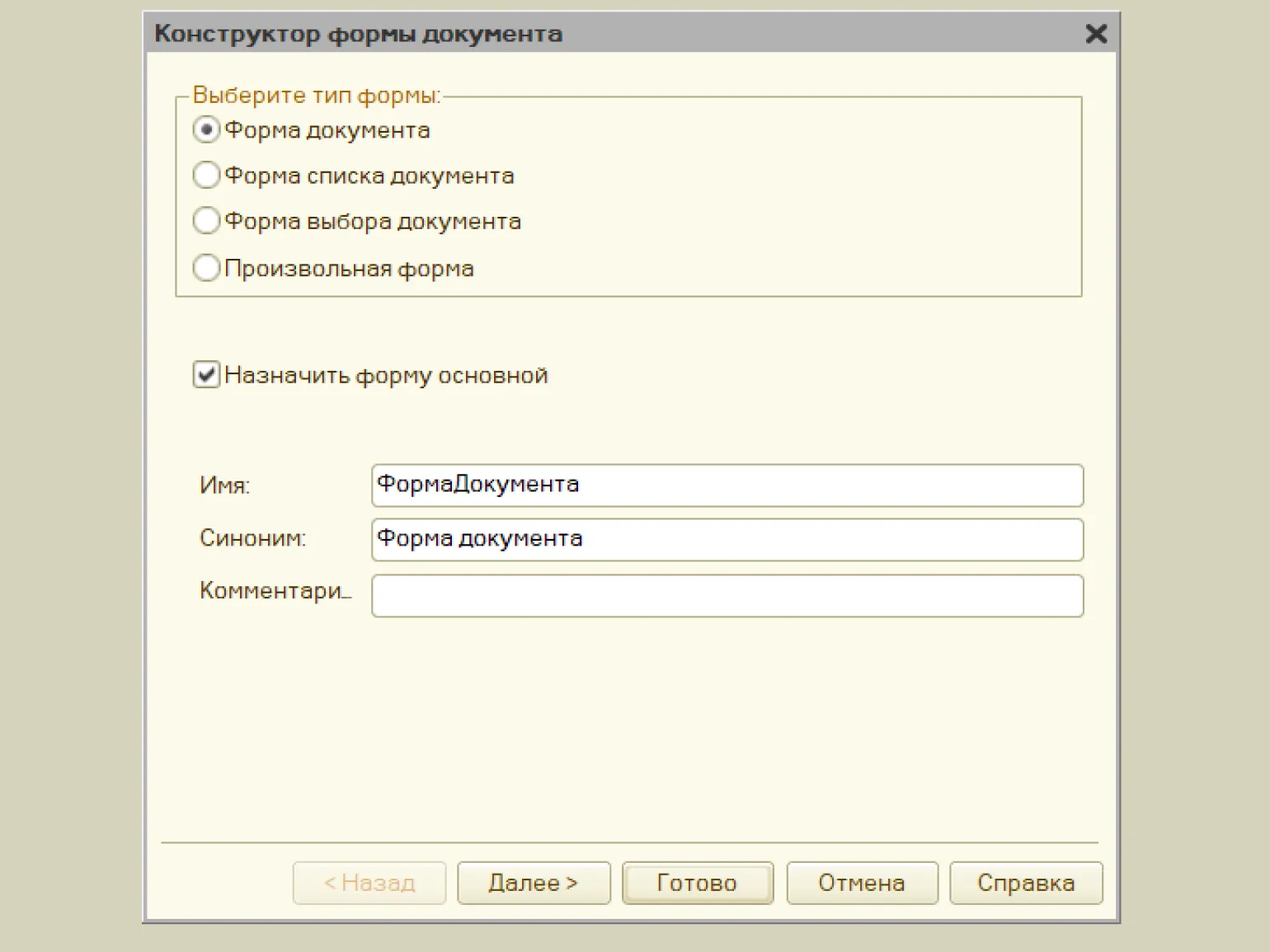
Click the «Next» button, to continue the process.
In the designer window, we select the elements that will be placed in the form interface. This process allows us to customize the visual presentation of the form by adding the necessary fields and components. The correct selection of interface elements affects the user's experience with the form and improves the overall efficiency of data collection. Consider how each element will be perceived and used to create an intuitive and functional interface.
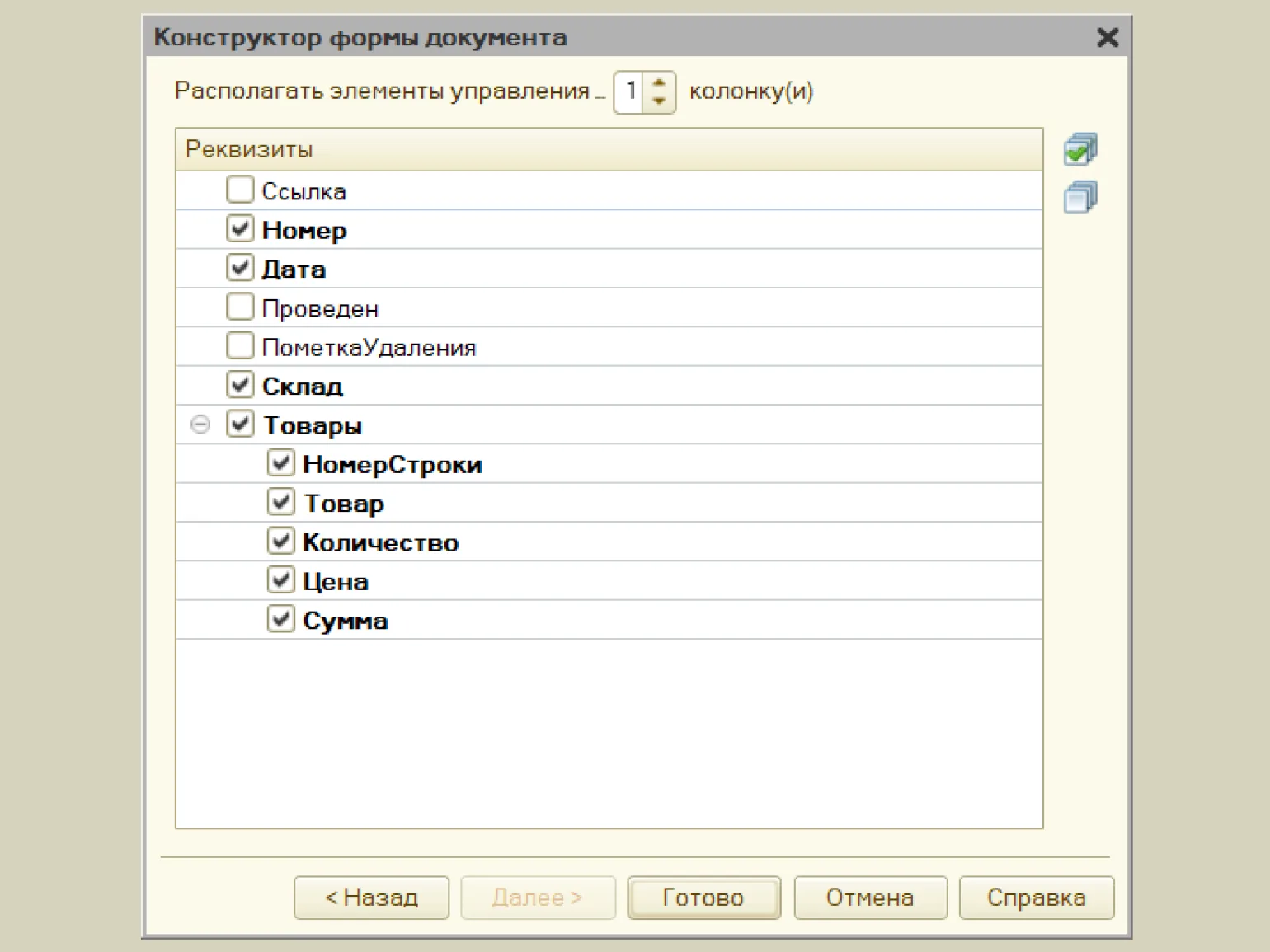
After clicking the button "Ready" will open the form editor window. This window will automatically create a form for the "GoodsReceipt" document object, containing fields for entering the required values. This simplifies the process of working with the document and allows you to quickly configure the necessary parameters.
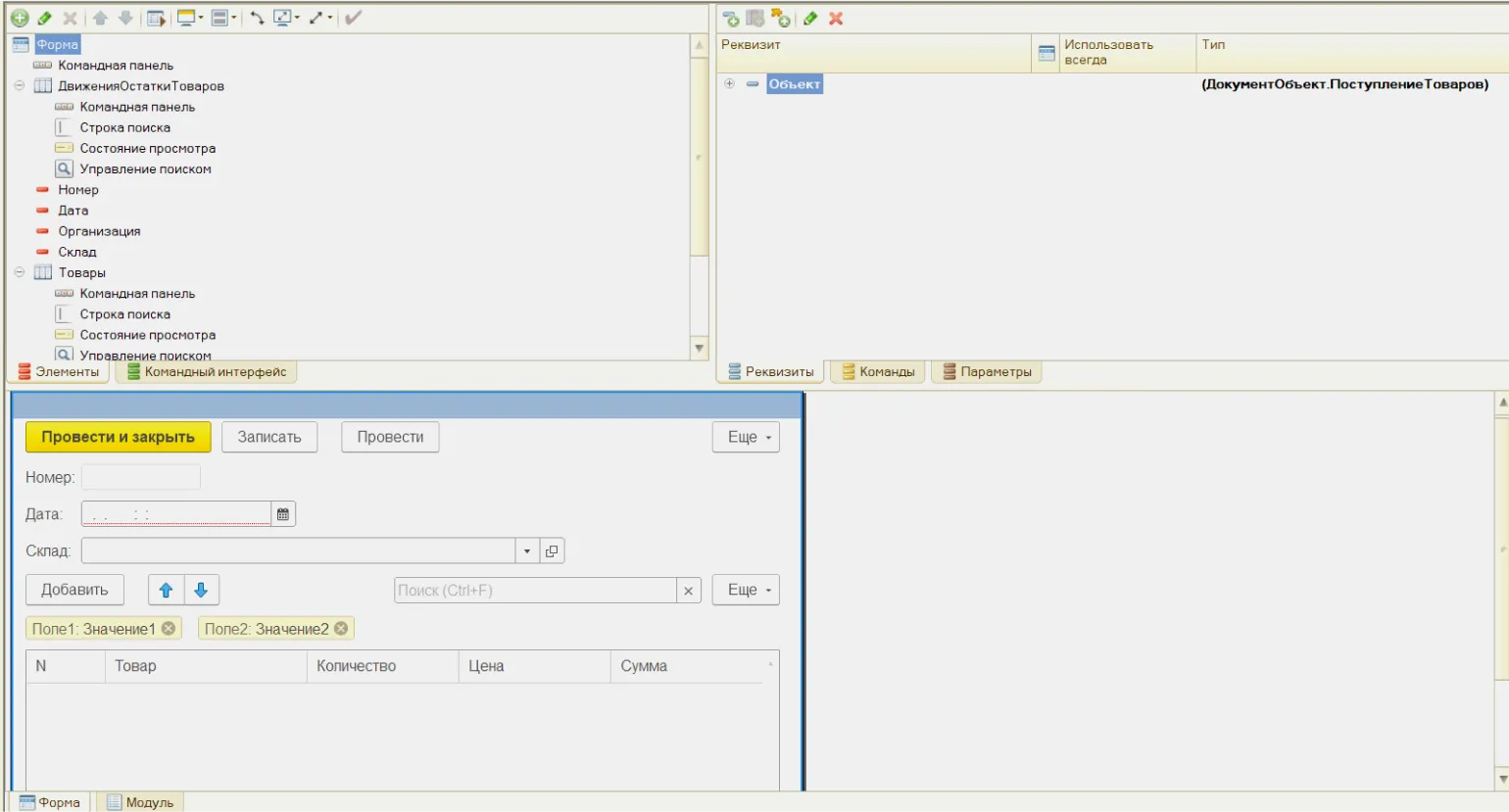
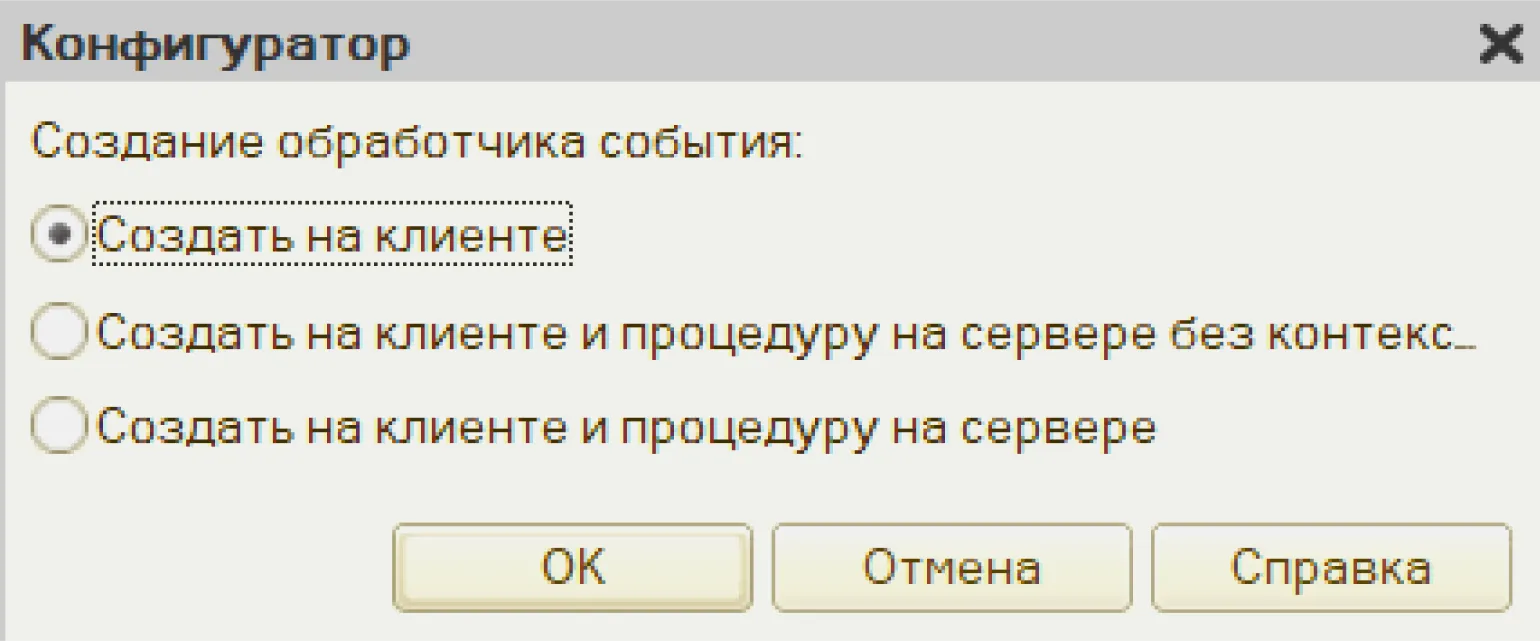
It is necessary to develop a script that will automatically recalculate the amount when changing the field values "Quantity" or "Price". To do this, double-click the "Quantity" field and open the object's properties palette. Then select the "OnChange" event handler. This approach will ensure dynamic updating of the amount, which will improve the user experience and increase the efficiency of working with the interface.

Creating an event handler by By default, client-side execution means executing code directly on the user's computer, without requiring interaction with the server. This solution makes sense because the script will function exclusively within the context of the user's application, providing a more complete and convenient display of data. This approach improves performance, minimizes latency, and improves user experience because all calculations occur locally.
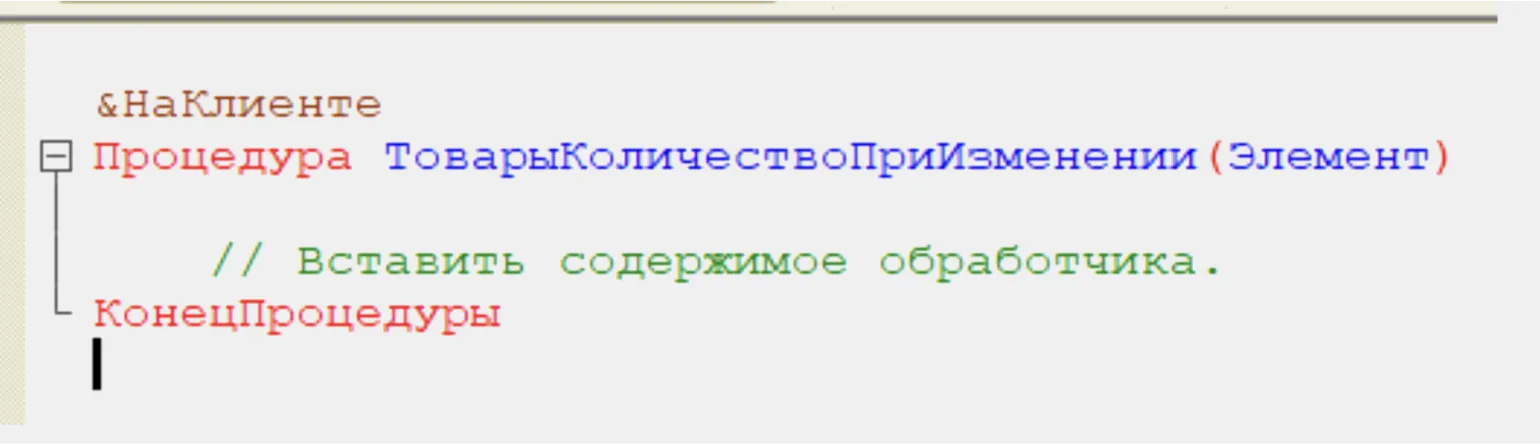
The form module is launched, in which automatically the procedure is generated.
Let's perform a similar operation with the form element «Price», which will allow you to create another one automatically generated procedure.
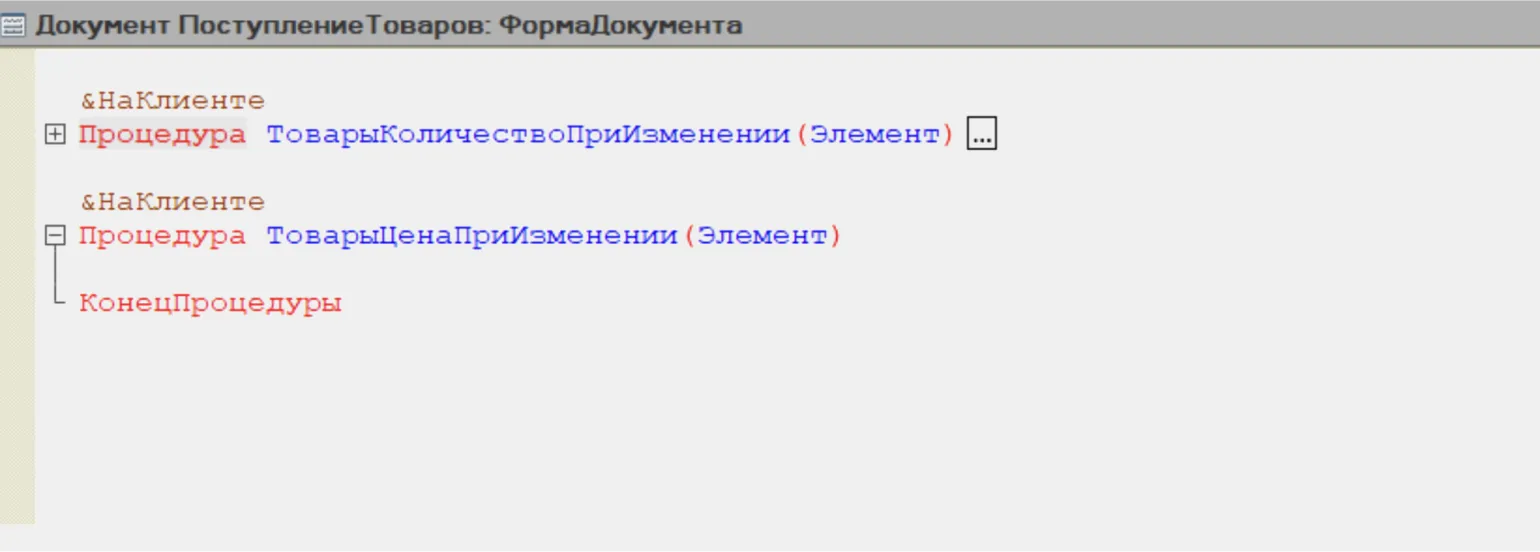
Identical code will be added to both procedures, which contains a formula for calculating the cost of the goods. This code will ensure consistency in calculations and improve the accuracy of product pricing.
The code can be simplified by separating the amount calculation into a separate procedure called CalculateAmount(). This will improve the readability and structure of the code, and will also simplify future maintenance. Separating the calculation logic into a separate function promotes code reuse and reduces the likelihood of errors. This will make the code more modular and easier to understand.
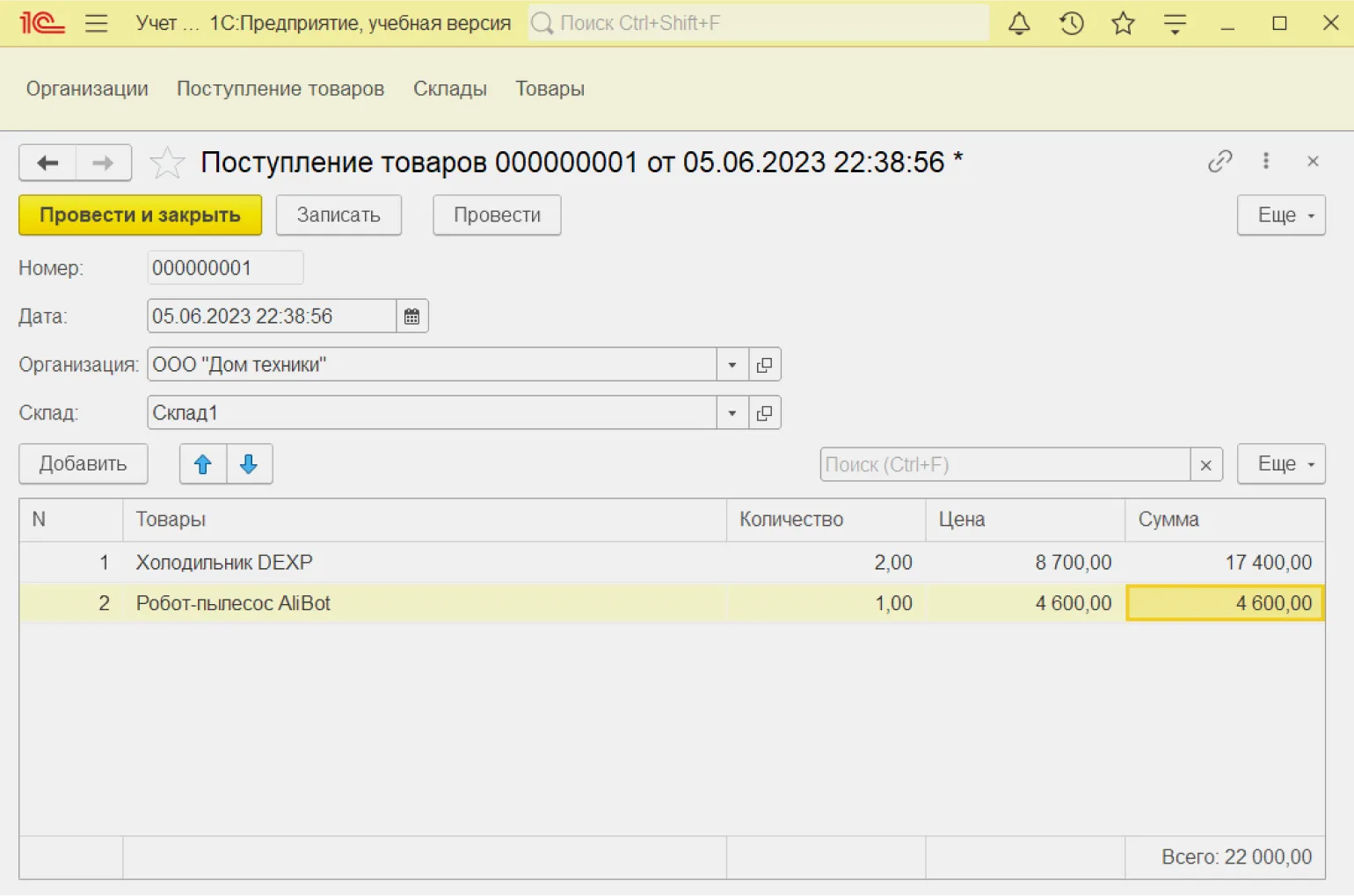
When running the program in user mode, we can observe that the amount is automatically updated when the values in the Quantity and Price input fields change. We continue to consider the functionality.
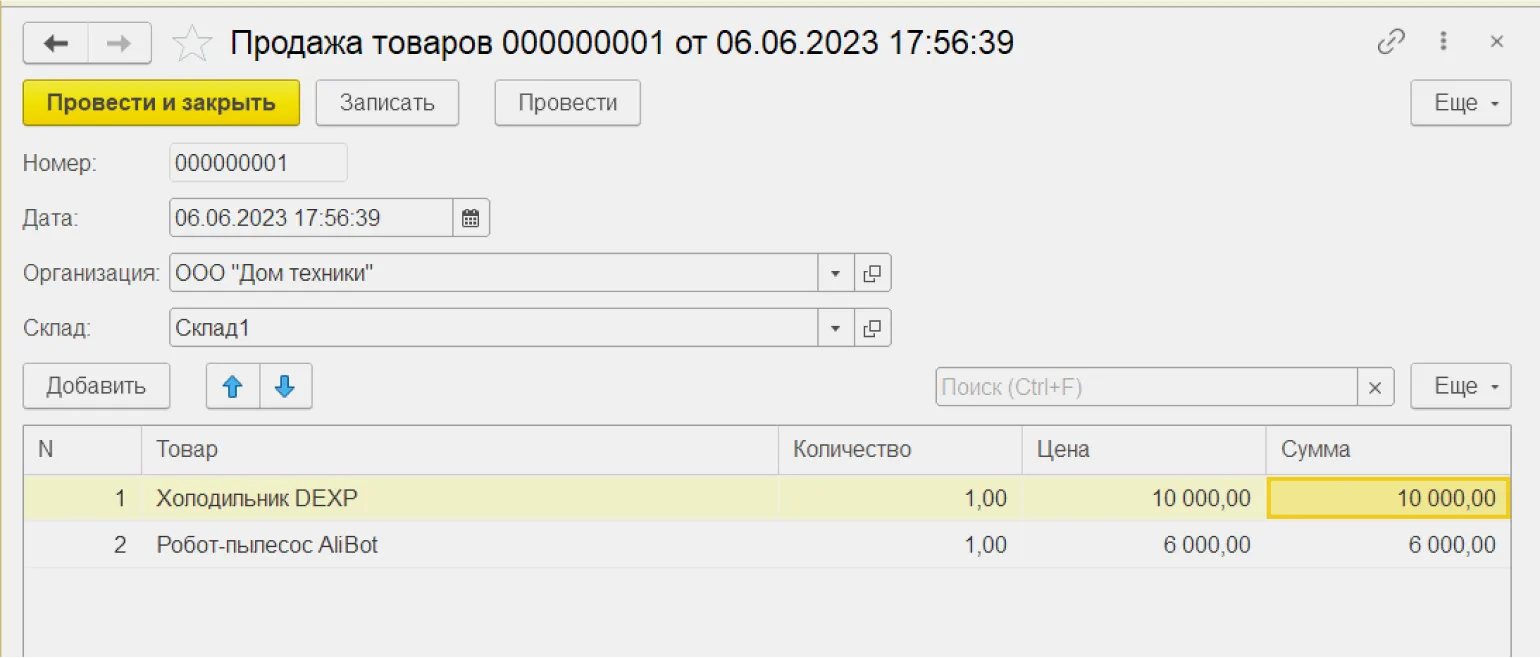
To successfully record product sales, we will need to create a document called «Product Sales». Its structure and procedures in the form module will be similar to the "Goods Receipt" document. It is recommended that you try to develop this document yourself, using the acquired knowledge to improve your skills. Creating the "Goods Sale" document will help you better understand the processes of accounting and product management in business.
Common modules
In documents Two identical procedures have been added to the GoodsReceipt and GoodsSale methods: CalculateSum(). However, following the DRY (Don't Repeat Yourself) principle, duplicating code is considered inappropriate. To avoid repetition, it is advisable to move this procedure to a common module. This will improve code maintenance and readability, as well as simplify future changes and optimization.
Common modules are configuration objects designed to store procedures that can be called in different parts of the program. Using common modules allows you to optimize your code, improve its structure, and increase function reuse. This is especially useful for projects that require consistency and efficiency in development. Common modules simplify code management and promote better readability, which ultimately improves development productivity.
Let's go to the "Common" section of the configuration tree and create a common module named "CommonDocumentModules". This module will serve as the foundation for working with documents, providing centralized access and management of common functionality. The creation of such a module will improve the organization and structure of data, and will also simplify the process of developing and supporting the system.

Let's make changes to the CalculateSum() procedure to improve it Functionality and performance. Code optimization will allow for more efficient data processing and accurate results. We will refine the calculation algorithm by adding the necessary parameters and conditions, making the procedure more versatile and adaptable to various use cases.
In the example provided, we created an export procedure, allowing it to be called from anywhere in the program. This ensures code flexibility and ease of use, allowing developers to easily integrate functionality into various parts of the application. The export procedure promotes code reuse and simplifies its maintenance.
In the form modules of both documents, the following code changes must be made:
Save the configuration changes and launch 1C:Enterprise in user mode. Next, we will create a new document "Sale of goods", which will allow us to effectively manage the process of selling and accounting of goods in the system.
Now We optimize the process of moving documents between registers.
Registers
Registers are configuration objects designed as tables with columns and rows, similar to Excel tables. These registers record all processes occurring with a document, which allows for the subsequent generation of reports based on this data. In the 1C system, this process is called movement through registers and is initiated directly from the document using the "Execute" button. Correct use of registers ensures effective accounting and analysis of data, which is especially important for business.
Registers play an important role in organizing and managing data. They systematize information and allow for its effective processing. Using registers allows users to quickly find the data they need and also simplifies the analysis and monitoring of various processes. Registers can be applied in various fields, including accounting, inventory management, healthcare, and others. Proper use of registers improves the accuracy and reliability of data, which in turn improves decision-making and optimizes workflows. Registers also facilitate compliance with regulations and standards, which is critical for many organizations. Retrieving data directly from documents is inefficient. Each time a report is generated, the program must search through all documents to extract and process data, which takes a significant amount of time. Using registers in the 1C system allows you to efficiently store and organize information, providing quick access and convenient report generation when needed. This significantly speeds up the process of data analysis and decision-making based on reported information. 1C 8.3 provides four types of registers. These registers are the main elements of the system and enable effective data management. Each register type is designed for specific purposes and has its own specific usage characteristics. Registers help automate data accounting and analysis, which significantly speeds up business processes. Proper understanding and application of each of these registers is key to successful work in 1C. Information registers are the simplest. Unlike other registers, data can be recorded in them without a recording document.
Accumulation registers can accumulate data across multiple dimensions. Let's look at a specific example by creating an accumulation register. This process will allow you to effectively organize and structure information, which will facilitate better data analysis and their more convenient use in the future.

Product Balances — is an essential element of inventory management in business. Effective tracking of inventory balances allows companies to optimize procurement and sales processes, minimizing costs and preventing stockouts. Proper inventory management improves customer satisfaction by maintaining the availability of popular products and promptly replenishing stock. The implementation of modern technologies, such as automated accounting systems and analytical tools, helps businesses more accurately forecast demand and plan procurement. Using data on product balances also contributes to a better understanding of market trends and consumer preferences, which in turn allows you to adapt the assortment and increase the company's competitiveness.
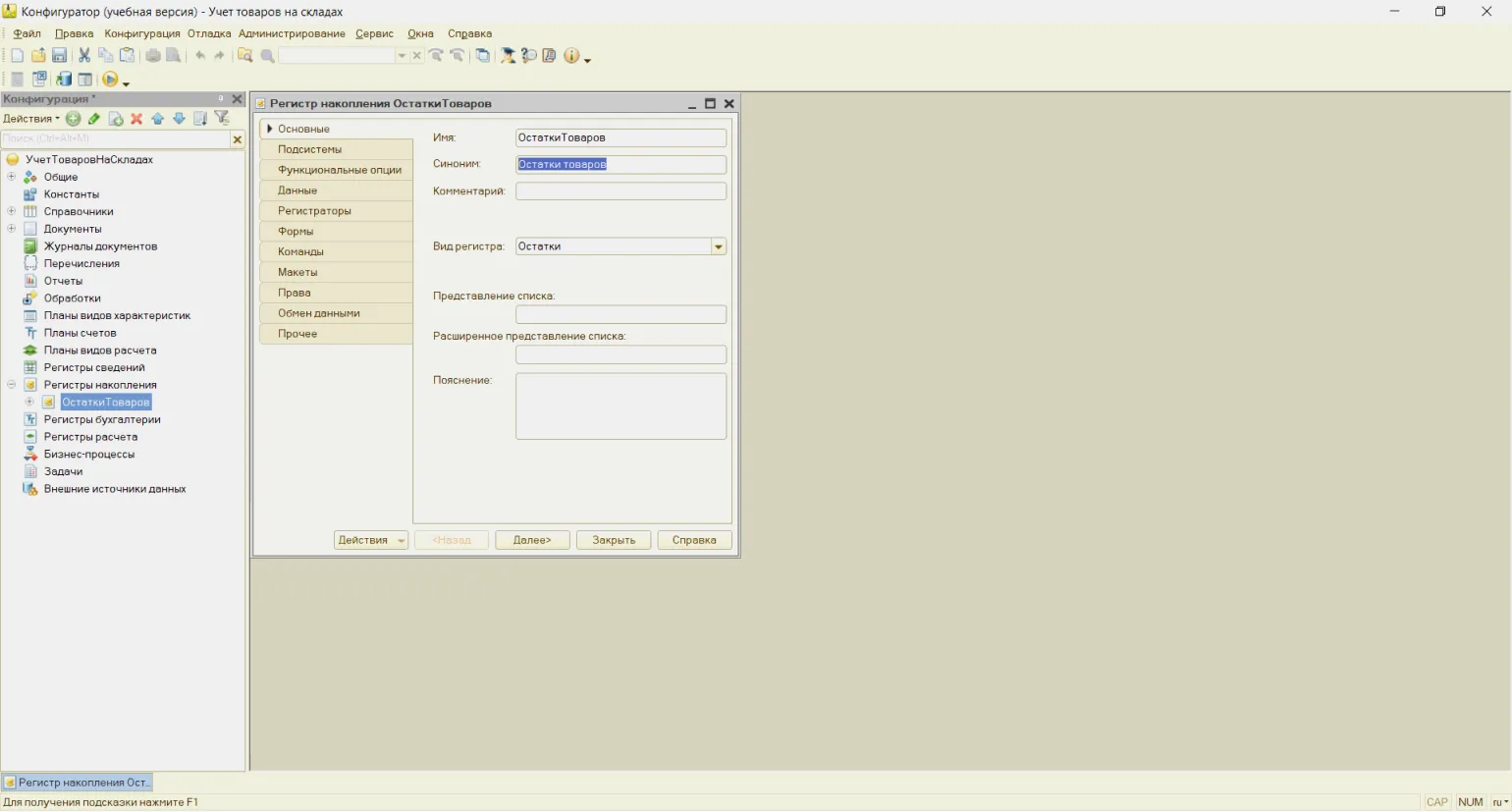
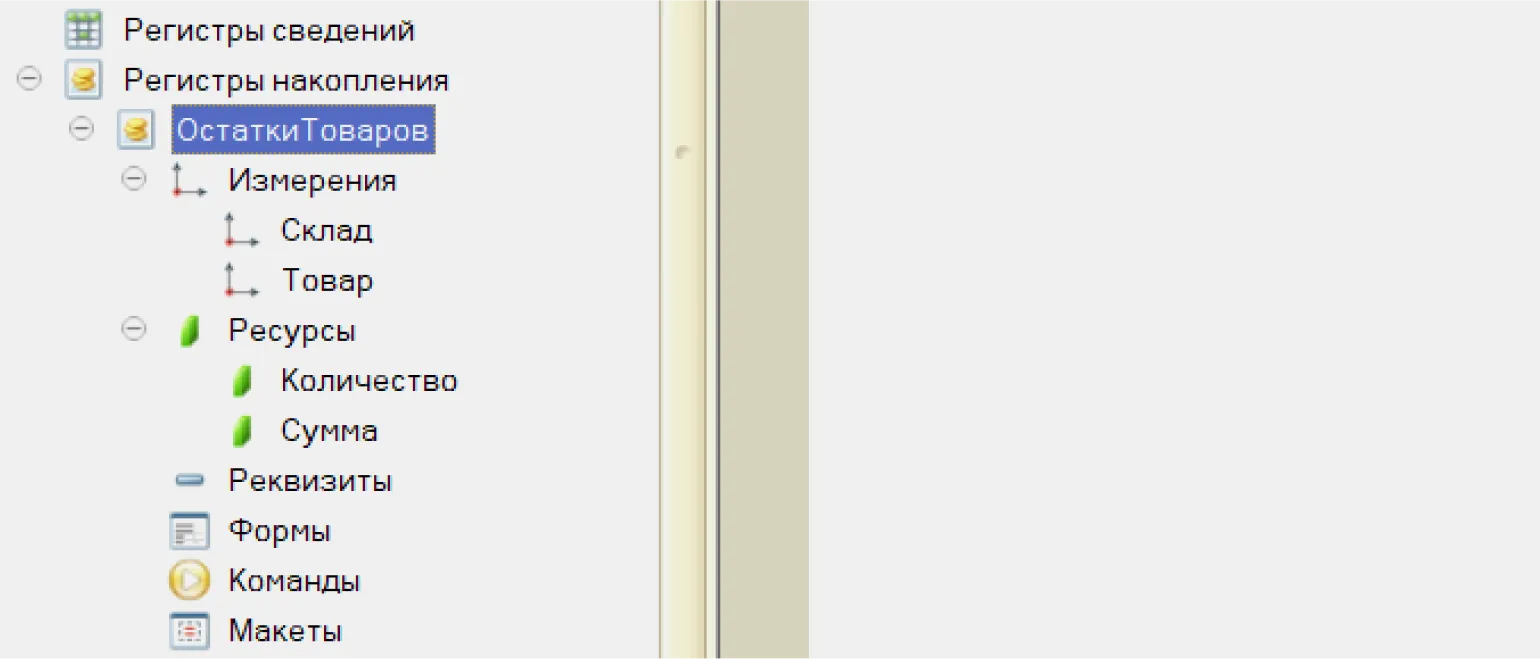
Let's set the measurement parameters:
- Warehouse (type - DirectoryLink.Warehouses);
- Product (type - DirectoryLink.Products).
To achieve optimal SEO results, it's important to correctly use keywords and phrases that will attract the target audience. Pay attention to current user queries and integrate them into the text.
Key resources to help you in this process include keyword analysis tools, search engine position tracking platforms, and competition assessment services. Use these resources to optimize your content and increase its visibility in search engines.
Furthermore, it's important to regularly update and revise your content to ensure it remains relevant and aligned with your audience's changing interests. Effective use of internal and external linking will also help improve your site's SEO rankings.
Don't forget the importance of quality content. Unique, informative, and useful content will attract more visitors and keep them on the page. Focus on creating value for your audience, and the results will be immediate.
- Quantity (type - non-negative number, length 10, precision 2). The quantity of products will be accumulated here.
- Amount (type - non-negative number, length 10, precision 2). The cost of goods will be accumulated here.
To generate register movements, open the Goods Receipt document. Right-click on its name and select the motion designer option.

Configure it as follows:
Optimizing your content involves using keywords that are relevant to your topic and target audience. It's important to create structured text that's easy for users and search engines to digest. Ensure headings and subheadings are logically distributed, and that information is presented in a clear and consistent order.
Also, pay attention to internal and external links, which add value to your content and improve its visibility in search engines. Use meta tags and alt attributes for images to improve SEO.
Don't forget about mobile responsiveness and page speed, as this also impacts search engine rankings. Update your content regularly to keep it relevant and interesting for readers.
By following these guidelines, you can create high-quality, SEO-optimized content that will attract more visitors and increase their engagement.
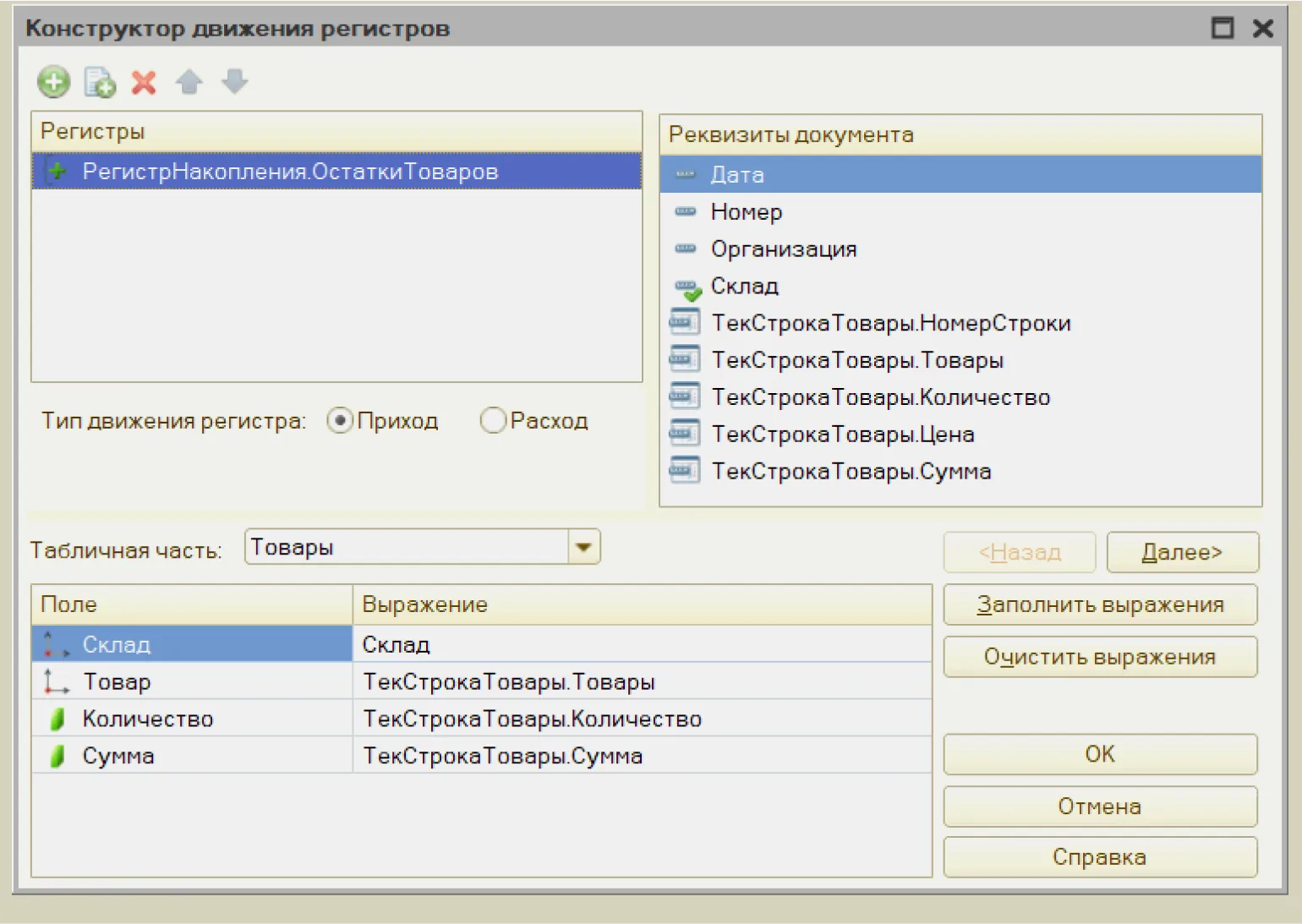
Now let's open the "Goods Receipt" document module. This module is designed for recording and processing goods received at the warehouse. It allows you to record information about new arrivals, control inventory, and track the movement of goods. It is important to fill out all required fields correctly to ensure accurate accounting and avoid future errors. Working with the "Goods Receipt" module significantly simplifies the inventory management process and allows you to quickly respond to changes in inventory balances.
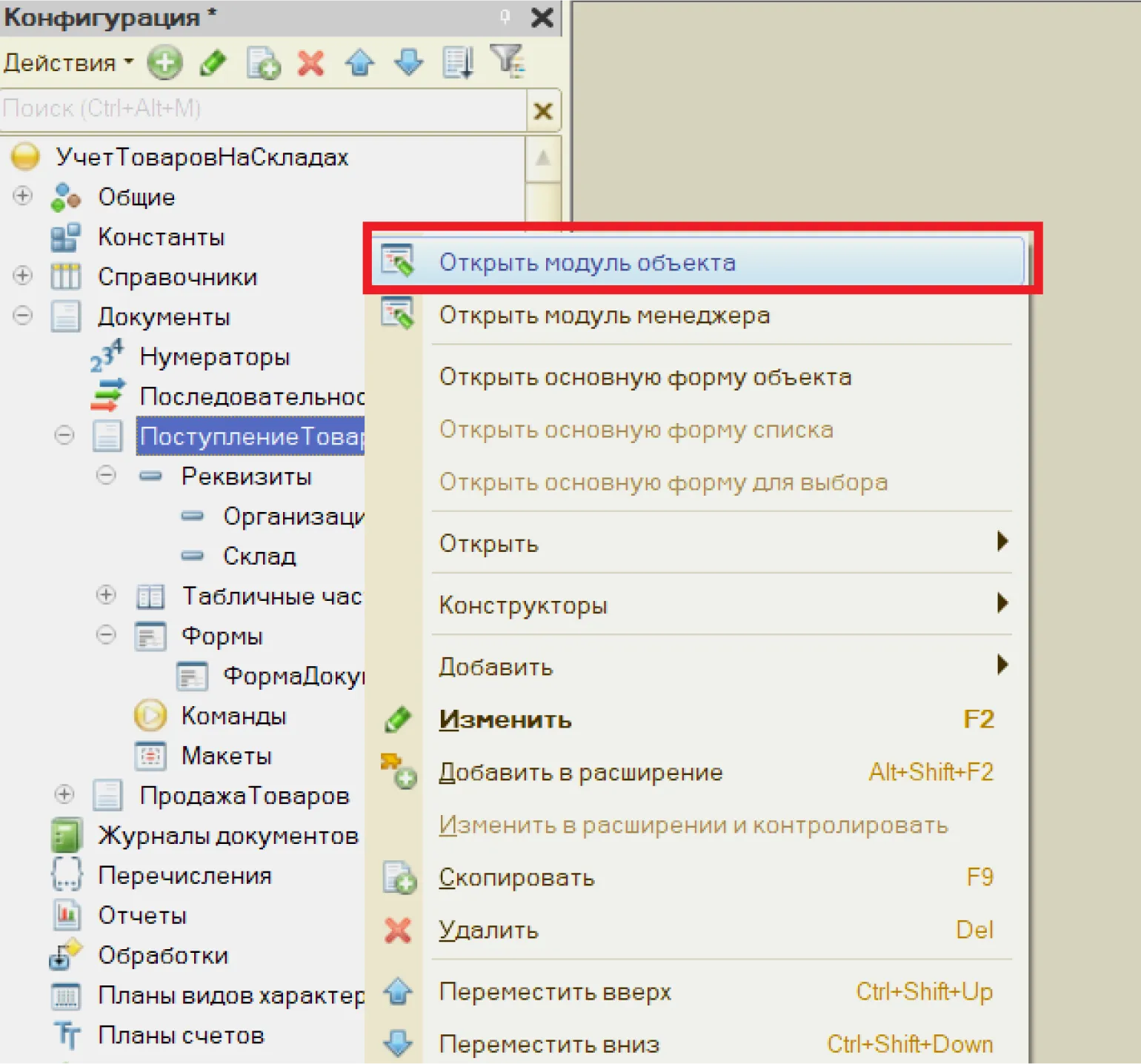
The program automatically I developed a document processing procedure.
We'll set up the "Sale of Goods" document by changing the transaction type to "Expense" in the designer. This will allow us to correctly record the write-off of goods and account for expenses. This setup will ensure accurate accounting and simplify the process of monitoring financial flows.

The program will automatically generate the code in the document module. This code will serve as the basis for further work with the document, allowing the user to easily integrate the necessary functions and elements. Correctly generating code in the document module ensures faster and more efficient development, minimizing errors and simplifying future changes. These capabilities make the document module an indispensable tool for developers and content managers.
Launch 1C:Enterprise and process the previously created documents. Now the Inventory Balance register displays all transactions, allowing you to track changes to document elements. This makes it possible to more effectively manage stocks and control their movement in the warehouse.
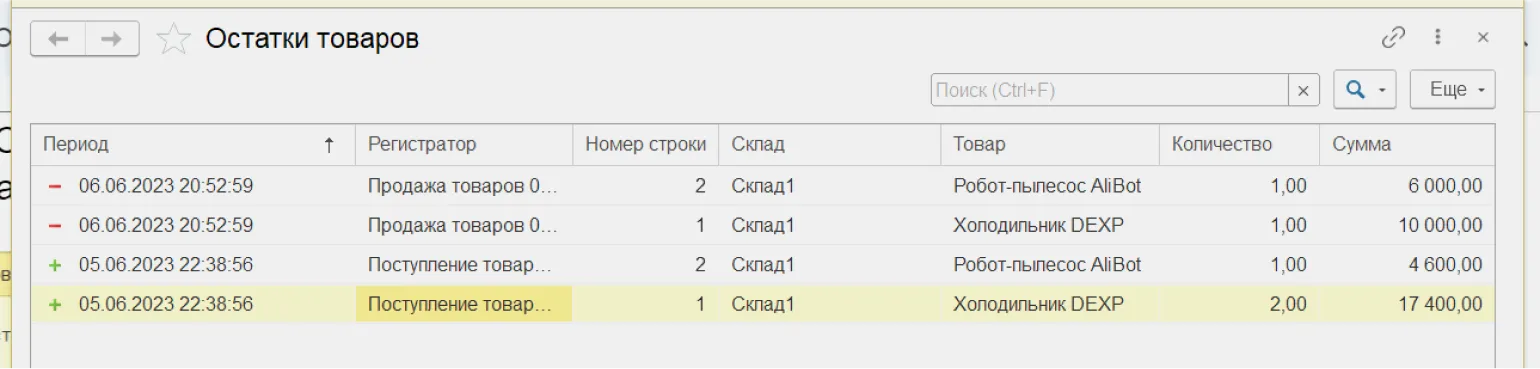
In this example, the movements of the document "Receipt of goods" are indicated by a green "+" sign, while While "Sales of goods" is represented by a red "-" sign. This visual indicator helps you quickly navigate the process of inventory control and tracking their movement. Using color indicators allows for effective inventory management and simplifies the analysis of operations related to the receipt and sale of goods.
Reports
We will create warehouse reporting that will allow you to track the volume of received and sold goods for a specified period. This will help you receive up-to-date information on the movement of goods and optimize inventory management.
In this section, we will consider a key mechanism of the 1C platform - the data layout scheme. This tool allows you to create reports with a complex structure, including settings, detailing, rollup, grouping, and filtering of data. The data layout scheme provides a declarative description, which simplifies the reporting process and allows you to customize it to specific business requirements. Using this mechanism provides flexibility and accuracy in data analysis, which is essential for making informed decisions.
With this system, the developer does not need to write code. Instead, they specify the necessary parameters through the designer interface, and the system automatically generates output data. The user, in turn, has the ability to flexibly customize the report to meet their requirements. This significantly simplifies the development process and reduces the time spent creating software solutions.
Let's create a report object. This object represents structured information designed to analyze and present data in a clear and accessible format. The report can include various parameters, such as performance indicators, statistics, and conclusions, allowing the user to quickly navigate the information presented. Proper design and organization of the report object contribute to a more effective perception of data and allow you to make informed decisions based on the presented results.

Product Report The product analysis and inventory management tool is an essential tool for product analysis and inventory management. This document allows you to evaluate sales performance, identify the most popular products, and determine areas for further business development. A properly compiled report helps optimize inventory, minimizing the risks of excess stock and shortages. It is important to consider both quantitative and qualitative indicators to gain a complete understanding of the current state of affairs. Regularly updating the product report facilitates a more rapid response to changes in demand and enables informed purchasing and marketing decisions.
Click the "Open Data Layout" button to access the data structure and organization. This action will allow you to view and edit the layout scheme, which is important for optimizing your work with data and using it effectively.

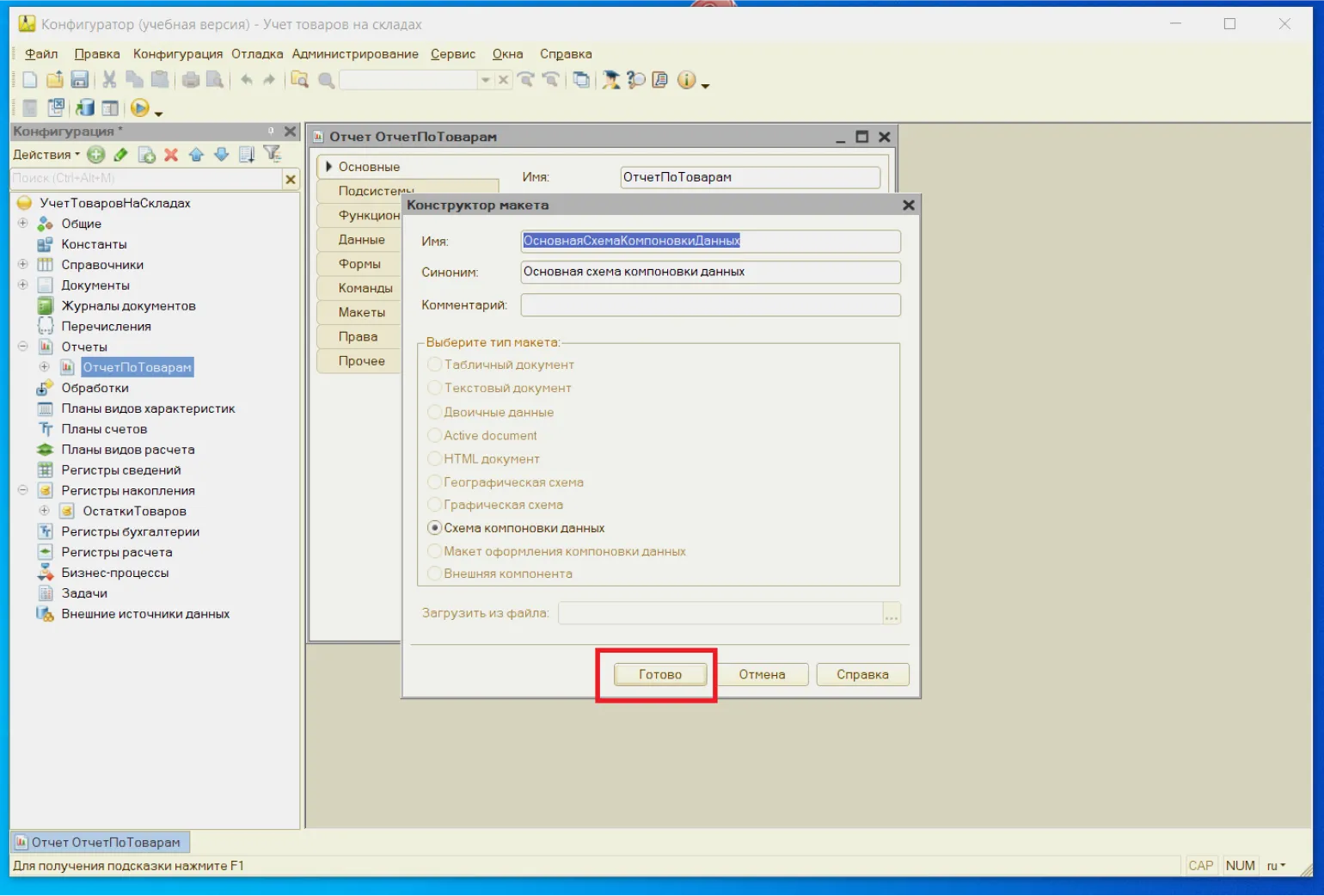
Click the «Done» button to go to the layout designer.
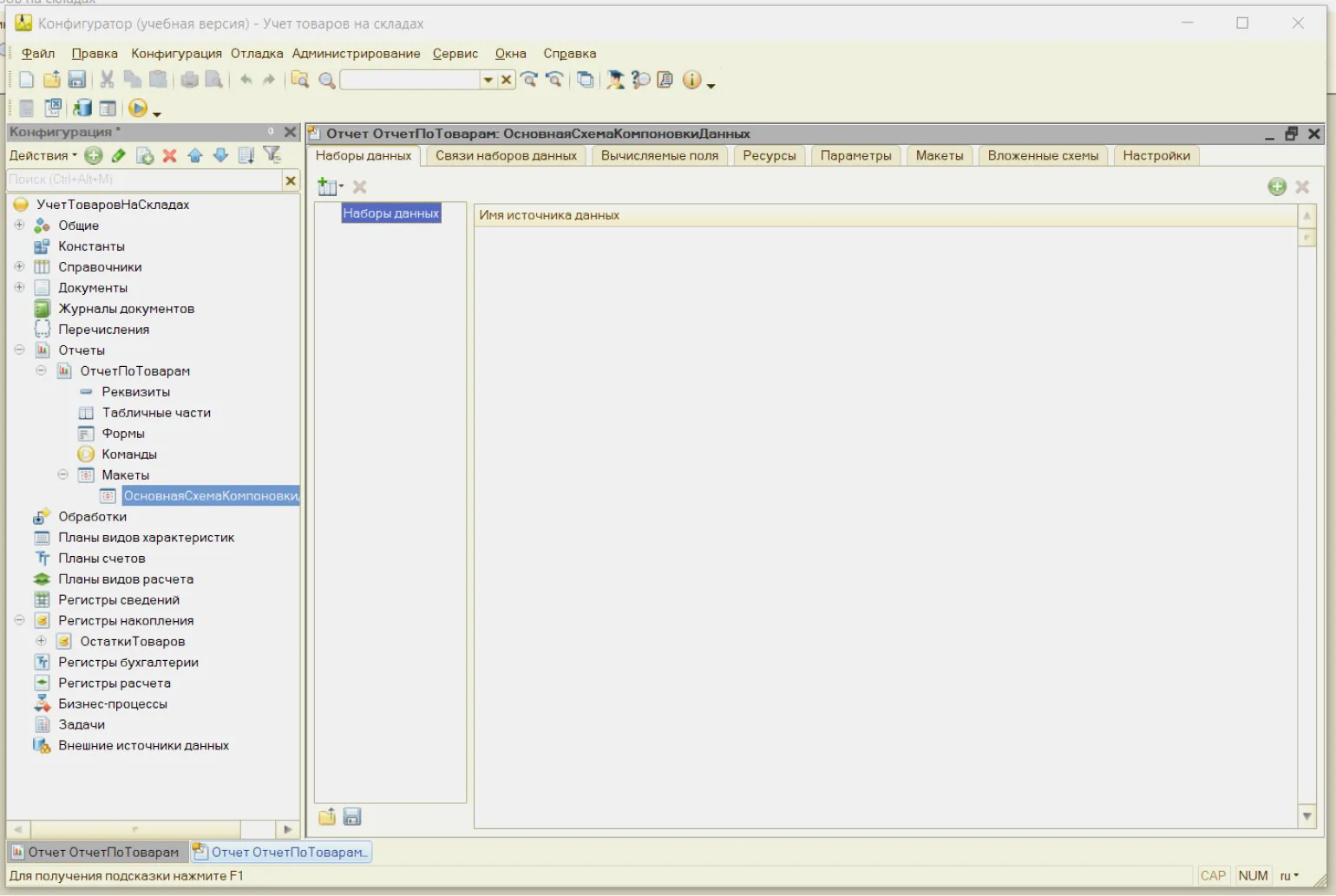
Creating a dataset for a query is an important step in analyzing and processing information. A dataset includes structured information that is used to perform various queries and analysis. When creating a dataset, it is necessary to consider the type of data, its format, and the target audience. This will enable efficient extraction and analysis of information, which in turn will contribute to more accurate decision-making and improved business processes. A properly organized data set is the basis for successful work with queries and allows you to optimize data processing processes.
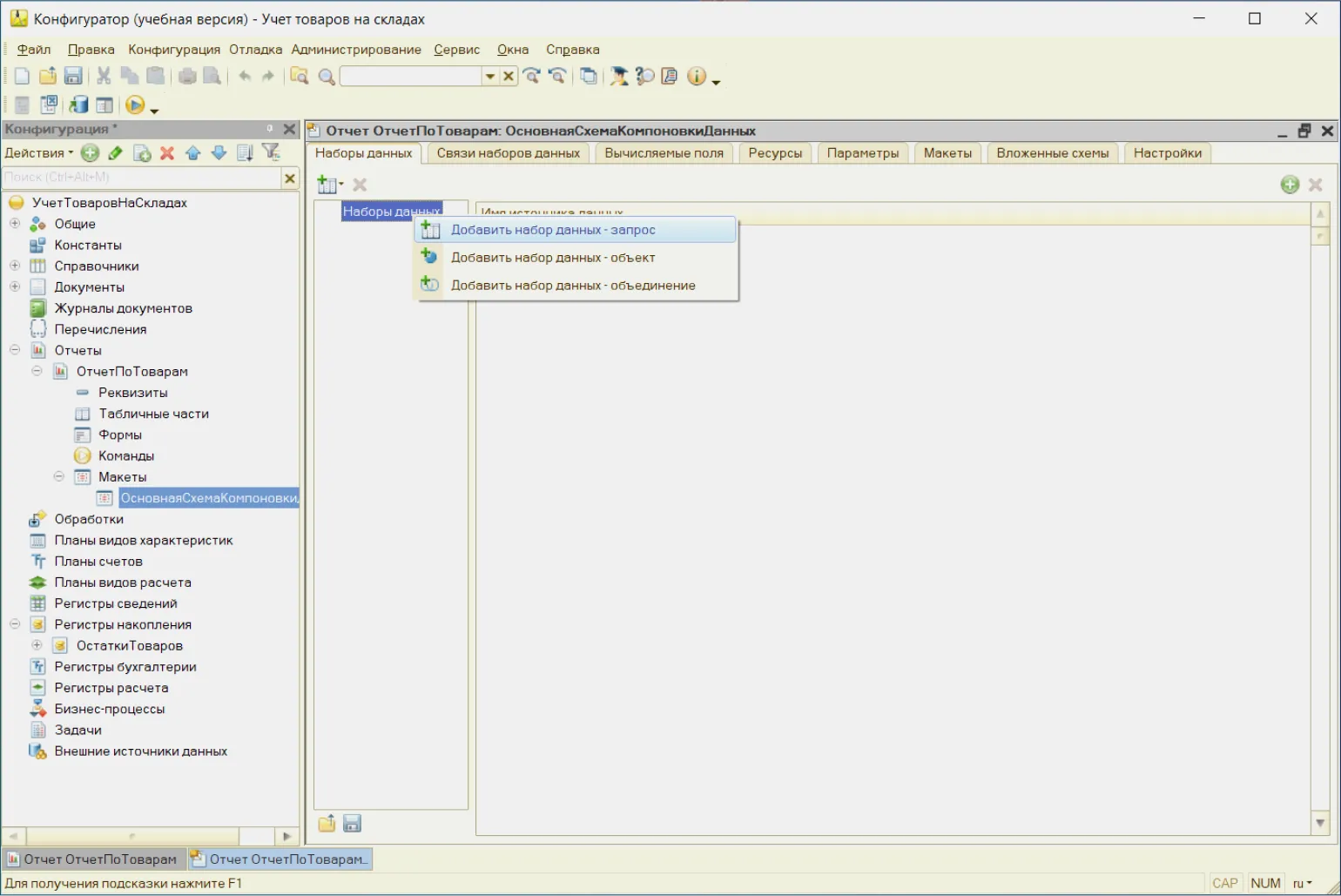
Click the button "Query Builder" to access the query creation tool. This tool allows you to create queries optimized to retrieve the information you need. Using the designer makes the process more convenient and efficient, which helps improve the quality of your data.

We use a virtual table to create the report Balances.BalancesAndTurnover. We transfer the necessary details to the Details Fields window. After that, confirm your choice by clicking OK.

The program automatically created the request text. Now let's go to the Settings tab.
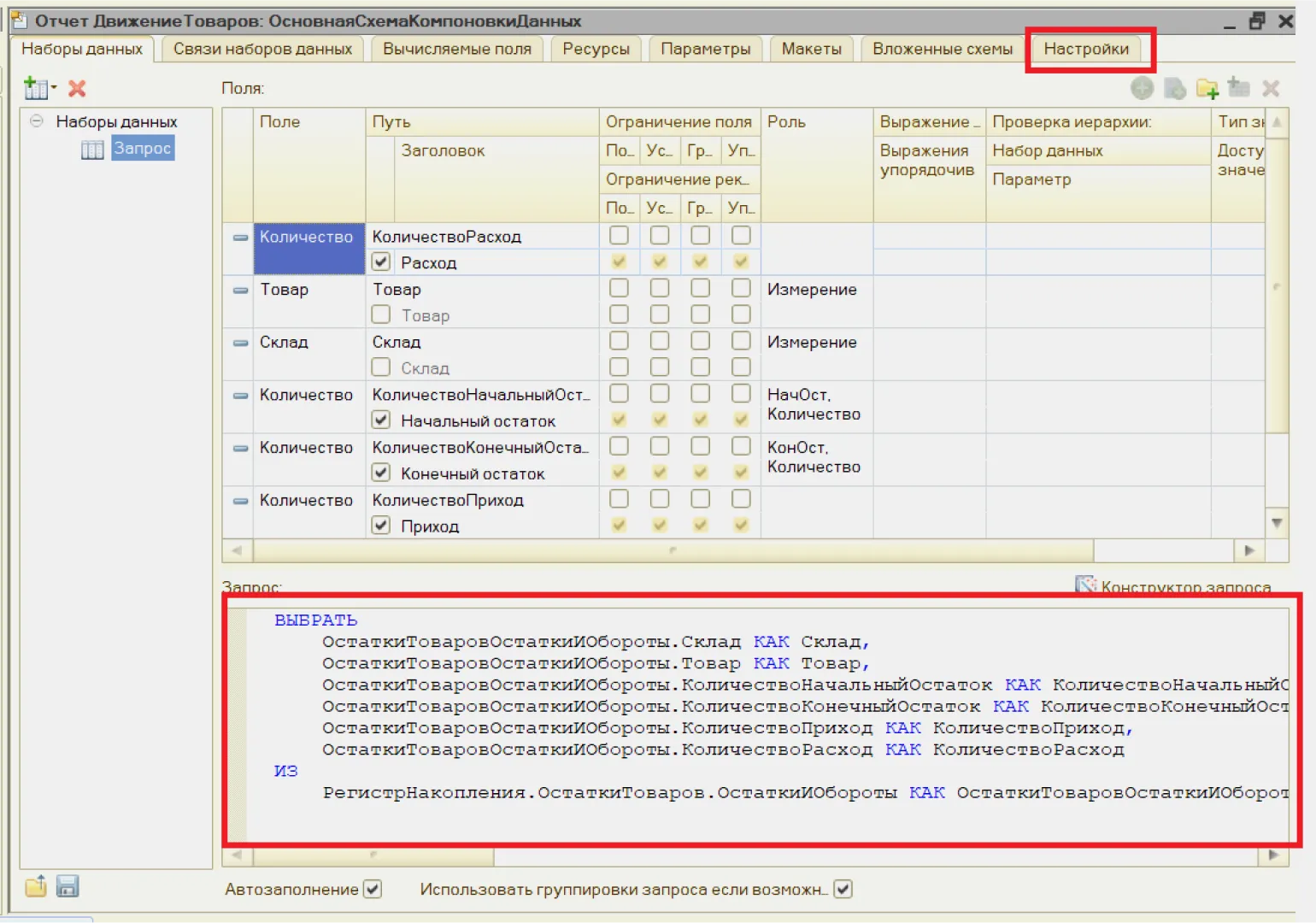
We define the necessary fields and form a grouping for management Warehouse.
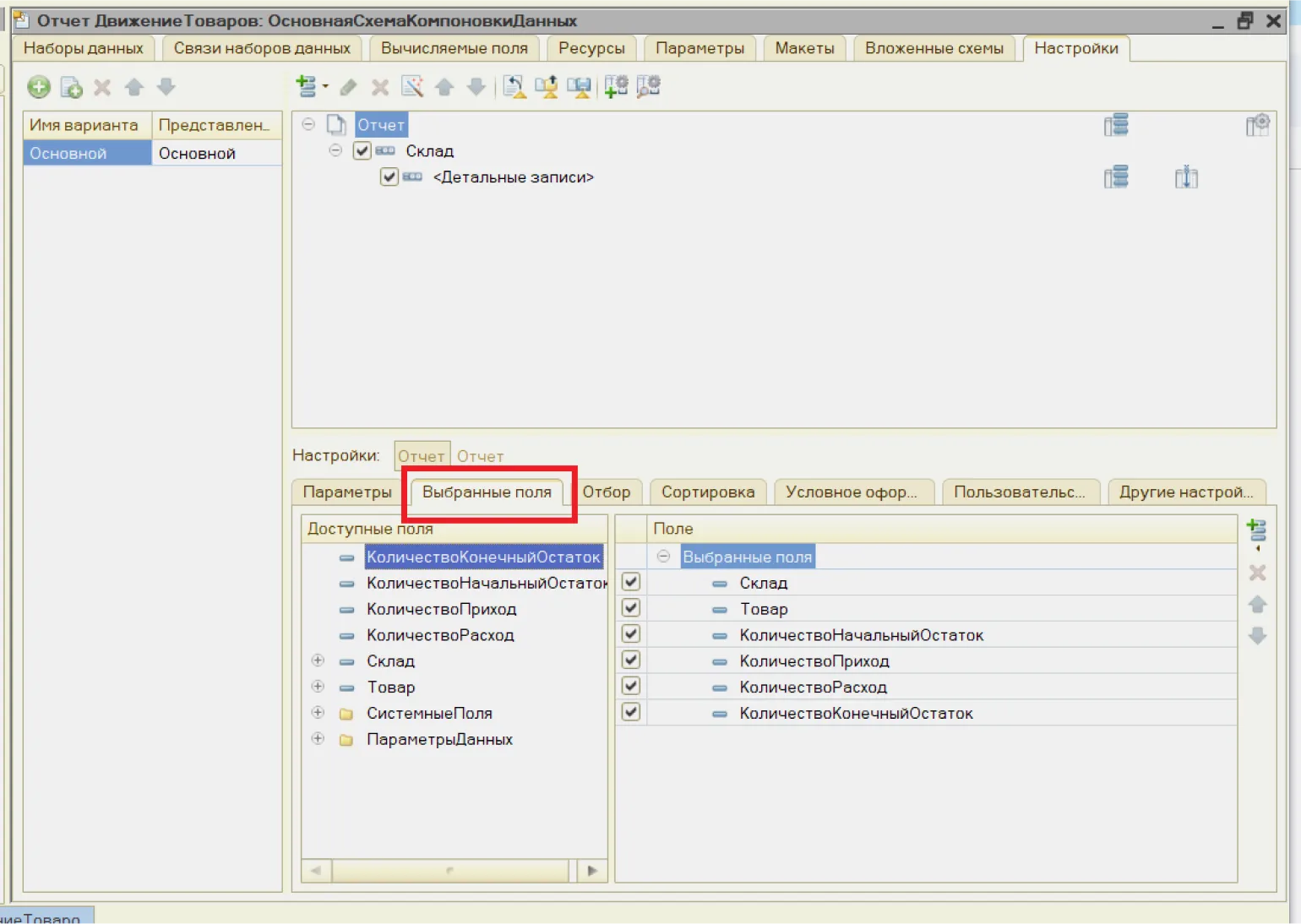
We can also set up filtering by the fields «Warehouse» and "Product". This approach allows for more precise management of product accounting processes and optimizes warehouse inventory, which contributes to increased business efficiency. Setting up these filters will help you quickly find the items you need and make it easier to work with inventory.

Sorting data by specified fields is an important task in information processing. It allows you to organize data, making it easier to analyze and search. It's important to note that sorting can be performed by various parameters, including numeric and text values. Proper implementation of sorting improves data management efficiency and enhances the user experience. Using optimized sorting algorithms can also significantly speed up the process, especially when working with large amounts of information.
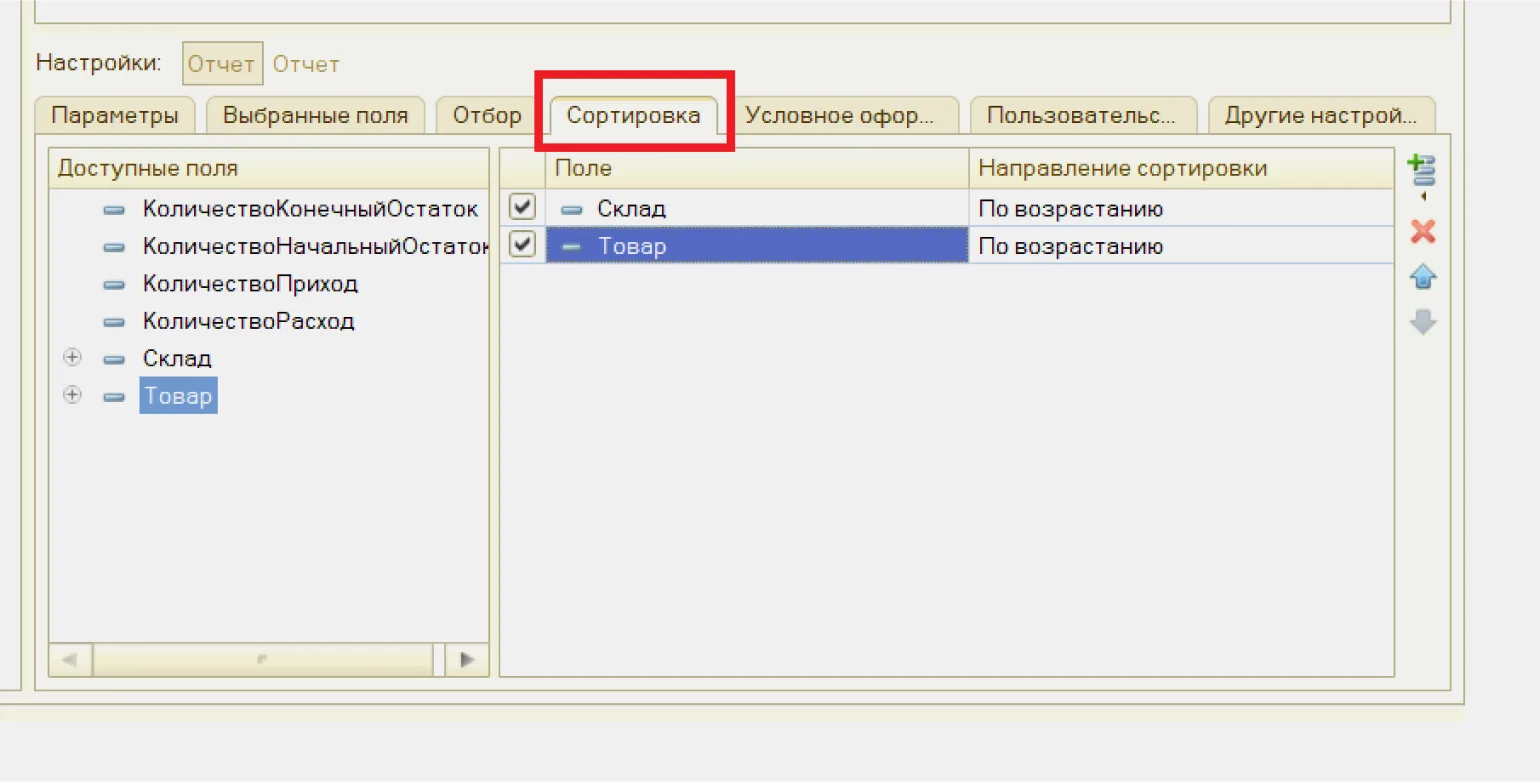
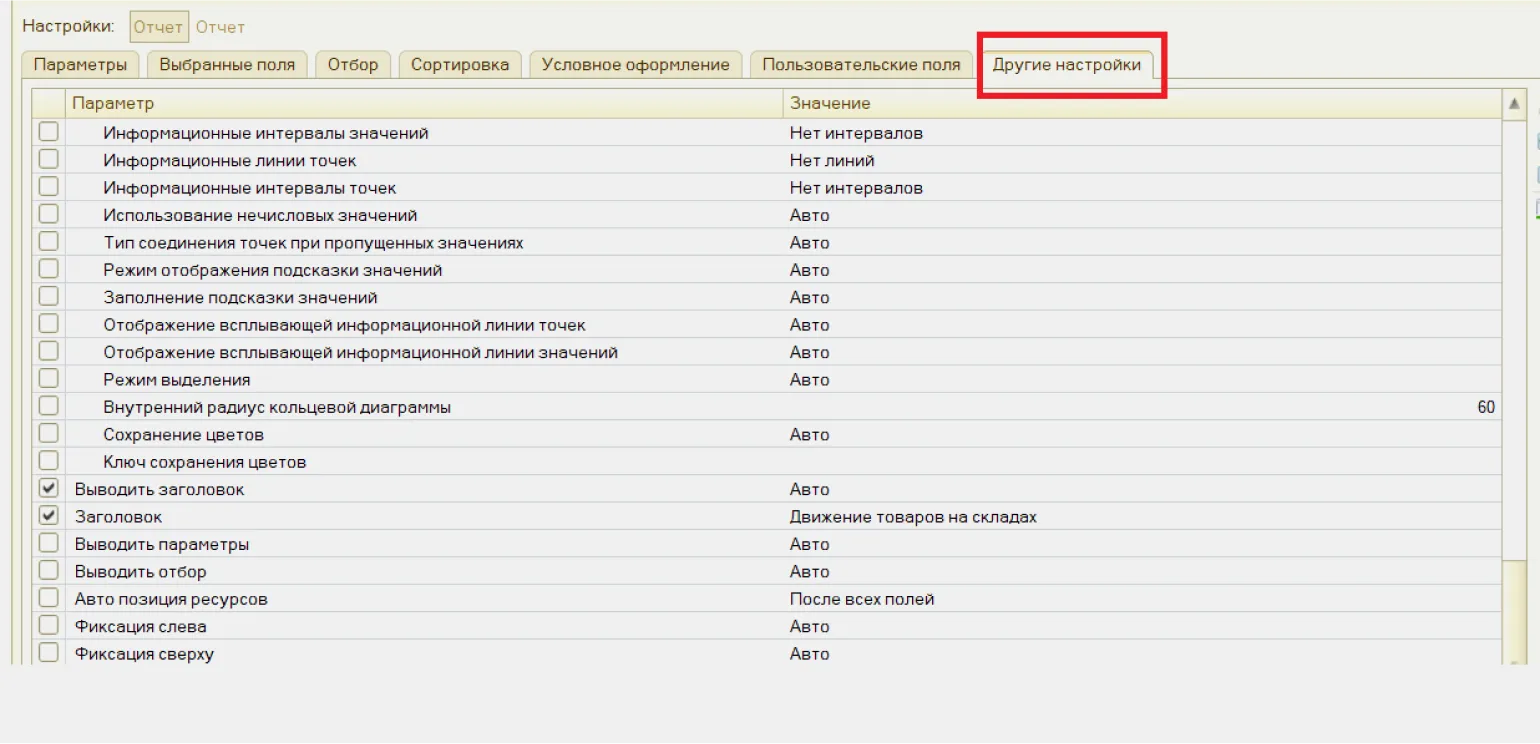
Go to the tab "Other Settings" and create a title for your report. This is an important step for defining the structure and content of the document. A well-defined title will help users quickly understand what the report is about and will also improve its indexing in search engines.
Save Changes and activate the information base in the user mode of the 1C:Enterprise program. This will allow users to work effectively with data and utilize all available system functions.
Working with a report in the user interface
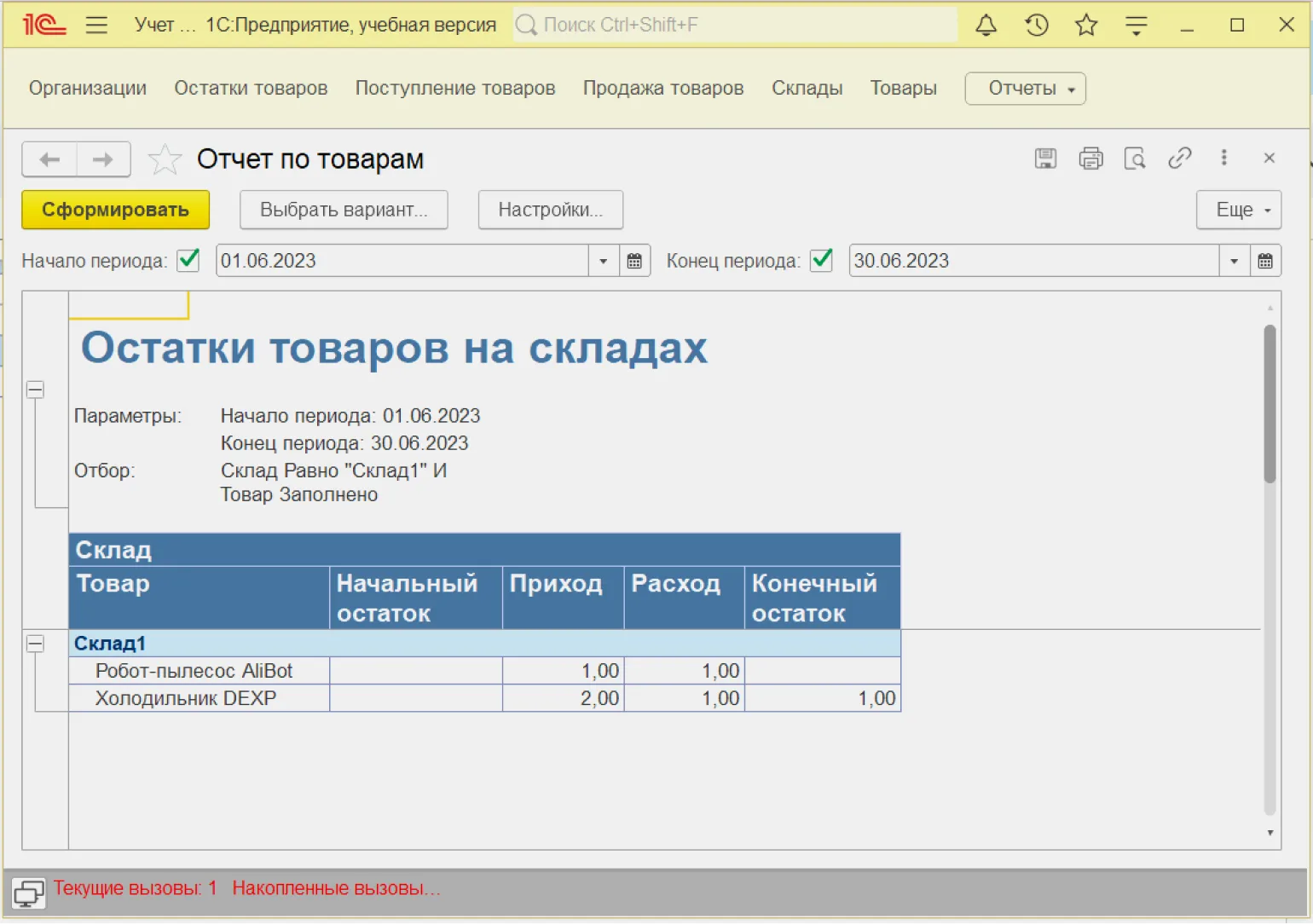
To generate a report on product balances, you must select the start and end dates of the tracking period. After that, click the "Generate" button.
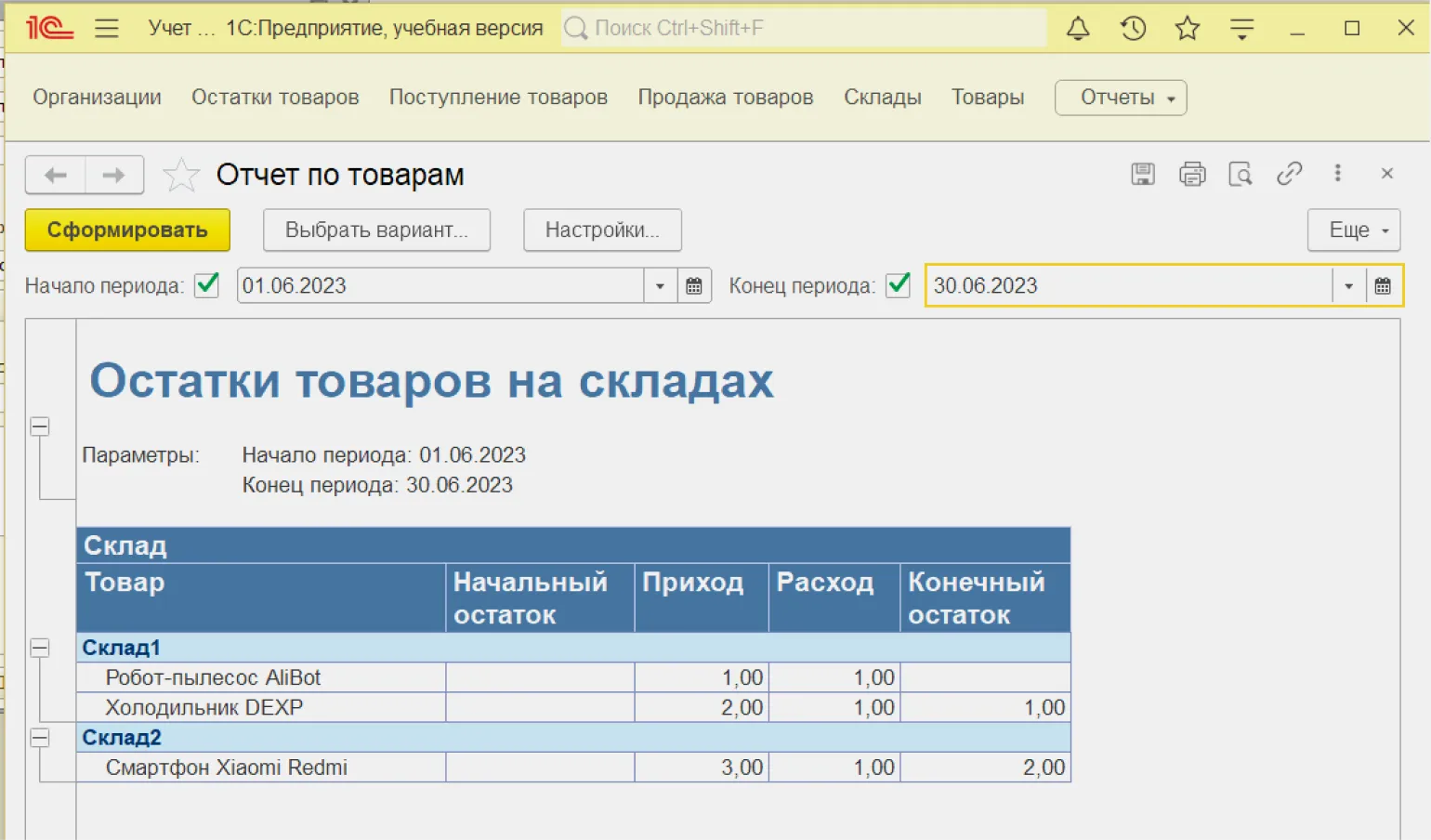
We can customize the report to make a selection for a specific warehouse. This will allow for more accurate data analysis and optimize inventory management.
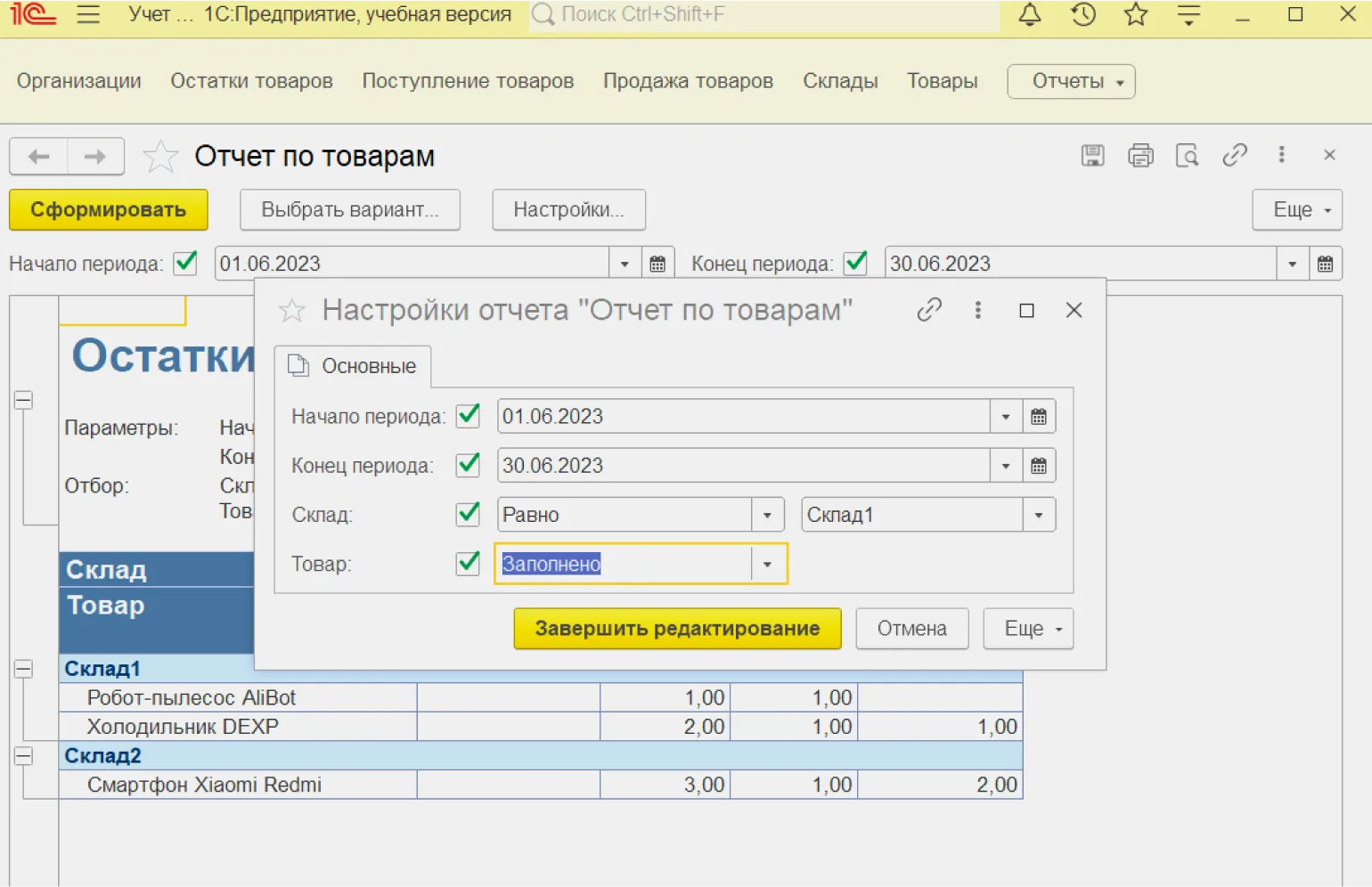
As a result, we will receive a report exclusively for "Warehouse 1".
1C Programmer Profession
We'll make sure you learn 1C programming and find your first job in just 6 months.
Find out more